
Mavix Marketing Mavix Marketing, home +1 (510) 312-5086

Free tool

See what search would return before you pay for it.

Six numbers you already have, one answer: what organic search would be worth to your business each month, and the month it pays back.

  • What it is

    A calculator that turns extra organic visits into enquiries, customers and gross profit at your own rates.

  • What it tells you

    Monthly profit once ramped, cost per enquiry and per customer, and the month the investment breaks even.

  • What you need

    Expected extra visits, your site conversion rate, close rate, profit per customer, monthly cost and a ramp period.

  • What to do next

    If the payback month is inside two years, send us the site and we will check whether the traffic gain is achievable on it.

Five numbers you already have

If you do not know, take your current monthly organic visits and model a 30% increase.
Your site conversion rate. Check analytics rather than guessing. Most service sites sit between 1% and 5%.
Your sales close rate on inbound enquiries.
Profit, not revenue, across the whole relationship rather than the first order.
Retainer plus any content or development cost.
Six is optimistic, nine to twelve is typical for a competitive market.

What that produces

Monthly gross profit once fully ramped $0
Extra enquiries per month 0
Extra customers per month 0
Monthly return on investment 0%
Cost per enquiry at this volume $0
Cost per customer at this volume $0
Month the investment breaks even Month 0
Cumulative profit after 24 months $0

How this is calculated

Enquiries equals visits times conversion rate. Customers equals enquiries times close rate. Monthly gross profit equals customers times profit per customer, minus the monthly investment.

The traffic gain is assumed to arrive in a straight line across the ramp period, which is optimistic. Real search programmes usually produce little for the first two to three months and then compound, so treat the break-even month as the earliest plausible one rather than the expected one.

What the result means

What the number means for your business.

It shows your ceiling, not a pitch

Any agency can build a case for its own service. This runs the same sum on your margins rather than a generic one, so the ceiling you see is yours. If the number is thin here, good execution will not rescue it.

It puts a date on the payback

Search does not pay back in the month you buy it. Knowing the break-even month up front is the difference between a programme you fund calmly and one you cancel in month four, just before it starts working.

It finds the cheaper lever first

Move the enquiry rate by half a point and watch the payback month jump. For most sites that lever costs less than buying more visits. This is where you find out whether yours is one of them.

How realistic is the result?

This is a model, not a forecast. It assumes the traffic gain arrives evenly across your ramp period and that every visit converts at one blended rate.

What moves the real number

  • Your industry and competition
  • Search demand for what you sell
  • Site conversion rate
  • Sales close rate
  • Customer value and margin
  • Starting position of the site

Where the sum flatters itself

  • Revenue typed into the customer value box instead of gross profit. This one is the most common and it can double the answer on its own.
  • The straight-line ramp. Real search programmes are flat for two to three months and then climb, so the early months here are kinder than yours.
  • Traffic that was never going to buy. A guide that ranks brings visits at a far lower enquiry rate than a service page, and one blended rate hides it.
  • No allowance for the work at your end. Approvals, developer time and content sign-off are real costs, and none of them sit in the monthly figure.
  • Rankings held forever. The model runs sixty months without a competitor ever responding, which is not a market anyone trades in.

Reading the result

Four things to do with the number.

Start at the payback month

The big figure at the top is a steady state you have not reached yet. The month you break even is the one you have to survive, and it is the number worth showing to whoever signs the invoice.

Check the enquiries against your capacity

Extra customers a month is only good news if you can answer them. If the figure is beyond what your team handles today, the plan needs a second column for who picks up the phone.

Compare the cost per customer you already pay

You almost certainly know that number from ads or referrals. If search lands well above it once ramped, the case is weak. If it lands below, the case strengthens every month after, because traffic does not switch off when the invoice does.

Run it a second time, pessimistically

Halve the traffic gain, take a point off the enquiry rate, then look at the payback month again. If it still clears two years, the plan survives being wrong. If it does not, you have just found the assumption the whole case rests on.

Real accounts

What the same sum produced on real accounts.

Two accounts where the sum was done first, then the pages were built. The figures are read off Search Console and GA4.
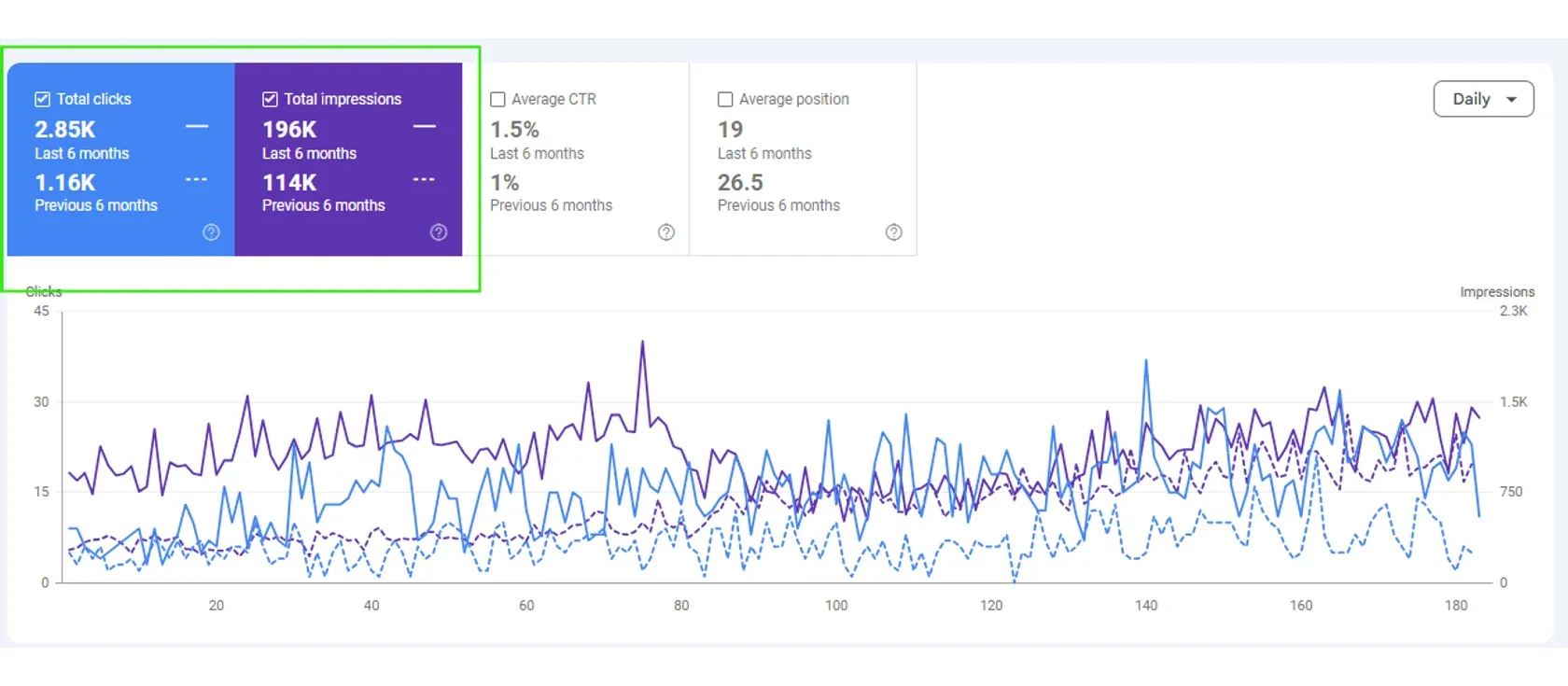
Search Console comparing six months against the previous six: clicks 2.85K against 1.16K, impressions 196K against 114K, average position 19 against 26.5

La Vela CoffeeSEO

+146%organic clicks
  • 2.85Kclicks, from 1.16K
  • 196Kimpressions, from 114K
  • 19average position, from 26.5
Read from
The client's own Search Console
Period
Six months against the six months before it
Read the full story
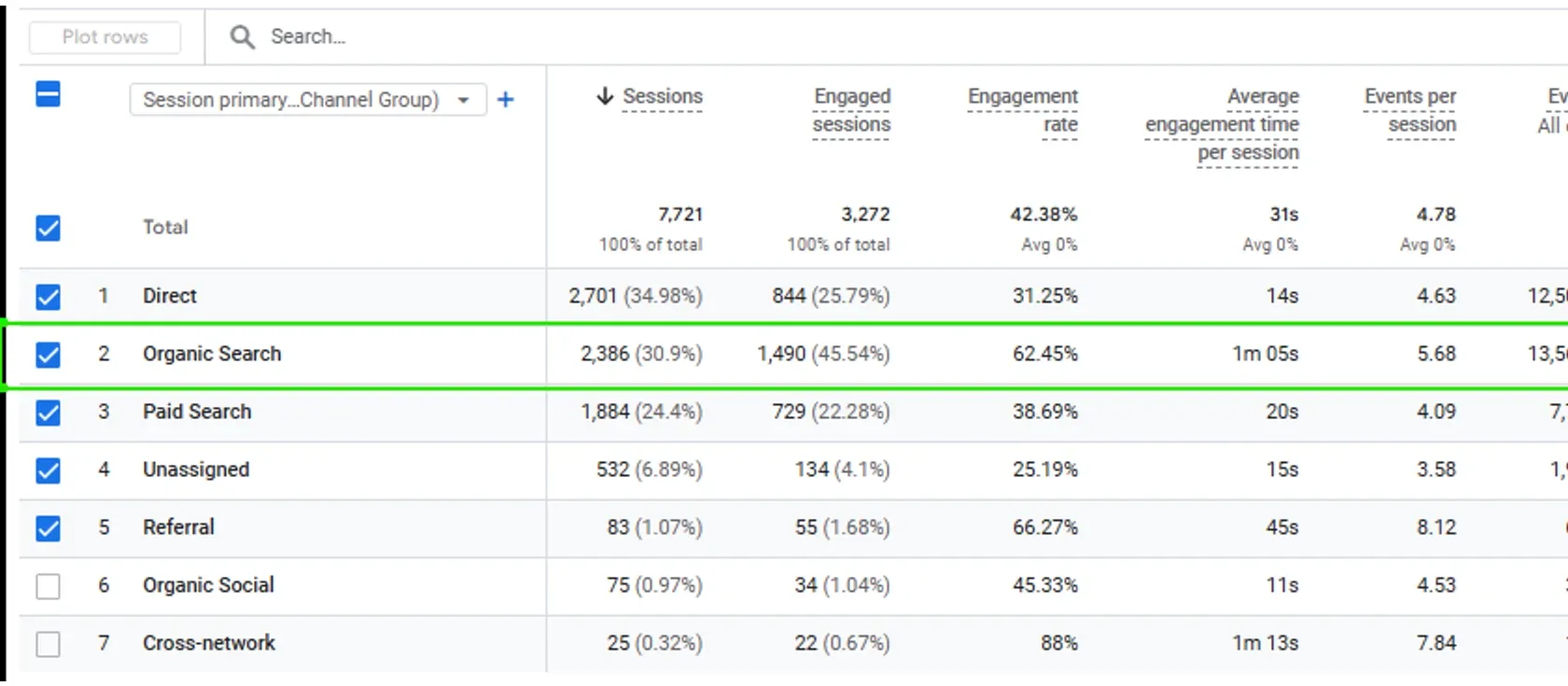
GA4 channel report with Organic Search highlighted: 2,386 sessions and 1,490 engaged sessions at a 62.45% engagement rate, against Paid Search on 1,884 sessions and 729 engaged

All Dogs RockSEO

45.5%of engaged sessions are organic

  • 1,490engaged sessions, the most of any channel
  • 62.45%engagement rate, against 38.69% paid
  • 2,386sessions, against 1,884 paid
Read from
The client's own GA4 property
Period
The GA4 report is a channel comparison
Read the full story

Questions

What people ask before and after using it.

01 What is the SEO ROI calculator for?
It shows whether paying for search could work at the numbers you believe about your business. You enter the extra visits you expect, how your site converts, how your sales team closes, what a customer is worth and what you would spend. It returns the enquiries, customers, monthly return, break-even month and cumulative profit after 24 months. It is a model of your arithmetic, so a thin result here is worth knowing before you sign anything.
02 Where does the click-through rate assumption come from?
From your own inputs. The calculator does not ship with a table linking ranking position to clicks, because every public one averages wildly different query types. Applying that to your market would produce a confident number that is wrong. Instead you enter the monthly organic visits you expect to gain. If you do not know, take your current visits and model a percentage increase. That keeps the arithmetic honest.
03 Why does it ask for close rate as well as conversion rate?
Because they are different and both matter. Visitor to enquiry is the website conversion rate. Enquiry to customer is the close rate, and it happens in your sales process rather than on the site. Marketing reporting that stops at the first number produces a healthy report and a quiet phone. The calculator multiplies through both, so the result is customers, which is the only figure your accountant recognises.
04 What should I enter for gross profit per customer?
Gross profit over the whole relationship, not first order revenue. If a customer typically buys three times, use the margin on all three orders. Take off delivery cost, staff time and refunds before you type the figure in. Using revenue rather than profit is the most common way this calculation flatters itself, and it can double the answer on its own.
05 Where do I find my visitor to enquiry rate?
In your analytics, as the share of visits that end in a form, call or booking. Set the goal up first if it is not tracked, because a guess here moves the answer more than any other input. If you have separate figures for service pages and blog pages, use the service page one. Blog traffic converts far lower and one blended rate hides it.
06 How realistic is the break-even month?
Treat it as the earliest plausible month rather than the expected one. The calculator assumes the traffic gain arrives in a straight line across the ramp period you set. Real search programmes tend to produce little for the first two to three months and then compound, so your early months will be leaner than the model shows. The default ramp of nine months is typical for a competitive market and six is optimistic.
07 What moves the real number most?
Your starting position, your market and your margin. A site that already ranks on page two gains traffic far sooner than a new one. A crowded market with strong competitors takes longer to move. A low margin means each customer covers less of the retainer. Search demand caps everything, because no amount of ranking produces visits for searches nobody makes. The conversion rate is the lever that costs least to pull.
08 What should I do with the result?
Start at the break-even month, because that is the period you have to fund before anything comes back. Check the extra customers against your capacity to serve them. Compare the cost per customer with what you already pay through ads or referrals. Then run it again with the traffic gain halved and a point off the enquiry rate. If the case still holds, it survives being wrong.
09 Does this replace the free review?
No. The calculator tells you whether the arithmetic could work at the numbers you believe. The free review tells you whether those numbers are achievable on your site, in your market, which is the harder question. If the model looks comfortable, the next step is to have a person look at the site and say whether the traffic gain you entered is realistic. You can request that through the contact page.
10 Is anything I type stored or sent anywhere?
No. The calculator runs in your browser and updates as you type. Nothing is sent to a server, nothing is saved and no contact record is created. Closing the tab discards it. The only thing on this page that keeps anything is the review form, and only if you choose to fill it in.
11 What are the common mistakes with this calculator?
Typing revenue into the profit box. Entering a conversion rate from memory instead of from analytics. Using a blended rate that mixes blog visits with service page visits. Counting the retainer but forgetting content, developer time and approvals at your end. Assuming rankings hold for five years without a competitor responding. Each of these flatters the answer, and together they can turn a marginal case into a convincing one.
12 Why does it say the investment does not pay back?
Because at the numbers you entered, cumulative profit never turns positive inside 60 months. Either the traffic gain is too small, the conversion rate is too low, or a customer is not worth enough to cover the monthly spend. Conversion work is often the cheaper thing to fix first. Raise the enquiry rate by half a point and watch the break-even month move before you consider buying more visits.

Next step

Would this work on your site? Find out.

The calculator says whether the arithmetic could work. The free review says whether it would on your site, in your market, from where you start.

Free, written by a person, yours to keep either way.

Free review

Send the address. We will tell you what it is costing you.

  • Search. What you rank for now, and the searches you should be winning.
  • Paid. What the spend is buying, and the campaigns quietly eating it.
  • Email. Whether the list is mailed at all, and what the missing flows are worth.
  • Tracking. Whether it measures anything real, or counts page views as sales.

The review is free, and yours to keep whether you hire us or not.

Send the site. We will say what we would fix first.

A minute to fill in. A written answer from a person, not a sequence.

Free, and yours whether you hire us or not.

Free review

A written plan for more enquiries from your site.

  • What you rank for, and what you should.
  • What the ad spend is buying, and what a lead really costs.
  • Which follow-up emails your list is missing.
  • Whether your tracking counts anything real.

Read by a person, written for your business, back within one working day. Yours to keep whether you hire us or not.

150+ businesses since 2019. No sequence, nobody chases you.

Free, and yours whether you hire us or not.

Book a call

Pick a time that suits you.

Fifteen minutes with the founder, who will have read your site before you speak.