Consent Mode v2 for US advertisers: why your European Google Ads conversions dropped, and sales did not
For US advertisers: Google Ads conversions fell in Europe while orders held. How to tell if Consent Mode v2 is the cause, a ten-minute check and the fix order.
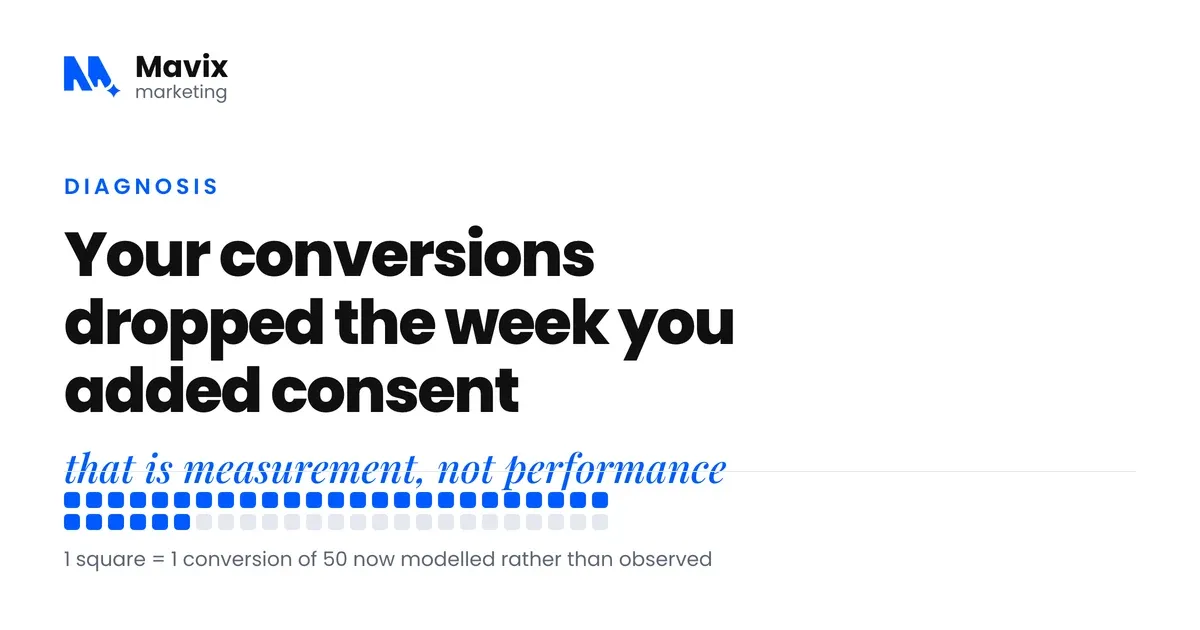
If you are a US advertiser and your Google Ads conversions from Europe fell while your actual sales there did not, check how your cookie banner talks to Google before you touch a campaign. Google’s EU user consent policy covers visitors in the EEA, the UK and Switzerland, wherever the advertiser is based. Google says advertisers who fail its consent audit can lose ad personalisation, remarketing and conversion measurement (Google Ads Help).
In July 2025 advertisers reported notices from Google saying it would disable “remarketing and conversion tracking functionality” on sites that did not comply (PPC Land, quoting the notices). The campaigns kept spending. The reporting went quiet.
This post is for diagnosing that drop. If you need to know who the requirement applies to and how to set it up from scratch, read Consent Mode v2 for US businesses with European visitors. If you have not implemented it yet, what happens if you skip Consent Mode v2 covers the consequences.
This explains Google’s product requirements, not legal advice.
The short version
- A drop in reported conversions with no drop in orders points to a measurement change, and for a US advertiser’s European traffic the consent setup is the first place to look.
- A broken tag takes conversions to zero everywhere at once. A consent problem leaves a plausible, lower number that is worst in the EEA, the UK and Switzerland, the places Google’s policy covers.
- Google Ads shows a consent mode status on each conversion action’s Diagnostics tab. Google says the status can take 48 hours to appear, and up to two weeks in some cases.
- Google only models conversions lost to consent choices once an account reaches 700 ad clicks over a 7 day period, per country and domain grouping. A US account with a small European budget may never reach it.
- Google’s often-quoted claim that modelling recovers more than 70 percent of lost journeys dates from April 2021 and applies only to accounts that qualify for modelling.
- Fix the banner first, keep campaigns running, and judge results only on a clean date range that starts after the fix.
Why did my Google Ads conversions drop when sales did not?
Because Google can now record fewer of the conversions that are still happening. Three things cause it, alone or together. Visitors who refuse are no longer measured with cookies. Missing consent signals can lead Google to suspend conversion measurement. Small accounts do not qualify for the modelling that would fill part of the gap.
The table below matches the symptom you see to the likely cause and the check that proves it.
| What you see | Likely cause | How to check |
|---|---|---|
| Conversions fall to zero everywhere at once | A broken tag or a removed conversion action, not consent | Diagnostics tab tag status, and Tag Manager preview on the thank-you page |
| A plausible but lower number, worst in European countries | Refusers no longer counted, and no modelling to fill the gap | Segment the conversion report by country and compare with orders by country |
| The drop starts the week a new banner went live | The banner started working, so refusers stopped being measured | Count real orders or enquiries for two weeks either side of the launch |
| Accept and Reject produce identical consent states | The consent update never reaches Google’s tags | Run Tag Assistant twice, once accepting and once rejecting |
| No consent status on the Diagnostics tab | Signals not arriving, or the status has not appeared yet | Wait 48 hours after a fix, then check again |
| European remarketing lists flat while traffic holds | New European users not being added | Audience Manager, list sizes over ninety days |
What changed, and when?
The changes arrived in stages, which is why many advertisers felt a slow leak rather than one bad week. These are the dates we can source:
- Early March 2024. Google Analytics Help says that if you take no action, only users outside the EEA are included in the audiences your linked advertising products use (Analytics Help).
- July 2025. Advertisers reported enforcement notices naming 21 July 2025, covering remarketing and conversion tracking for non-compliant sites (PPC Land). This comes from trade press quoting the emails, not from a Google Help page.
- 15 June 2026. Google says Consent Mode settings, rather than the Google Signals setting, now govern how Google Analytics data is collected for Google Ads (Analytics Help).
Before you panic about lost data, one figure is worth knowing. In April 2021 Google wrote that “on average, conversion modeling through Consent Mode recovers more than 70% of ad-click-to-conversion journeys lost due to user cookie consent choices” (Google Marketing Platform blog). It is five years old, comes from the company selling the feature, and only applies once your account qualifies for modelling. Treat it as a ceiling, not a promise.
What is Consent Mode v2, in plain terms?
Consent Mode v2 is the set of signals your website sends to Google saying what each visitor agreed to. Four signals do the work: ad_storage, analytics_storage, ad_user_data and ad_personalization (Google for Developers). Google’s tags read them and change what they record about that person.
Version two added ad_user_data and ad_personalization (Google Ads Help). The reason it broke so many accounts is that adding signals meant editing the tag setup, and many small business sites had a cookie banner installed once, years ago, by whoever built the site.
Which of the four banner failures do I have?
None of these throws an error. The site loads, the ads serve, and GA4 still reports something. That is why an account can run this way for months until somebody compares shop orders against Google Ads conversions and cannot explain the difference.
No default state is set before the Google tag loads. The tag runs before any consent state exists. Google’s verification guide expects the on-page default to read denied before the visitor chooses (Google Ads Help), and a setup without one fails that test.
The banner loads after the Google tag. The consent signal arrives after the first hits have already gone.
The banner is decorative. It looks like a consent tool, blocks nothing, and sends nothing to Google.
The consent update on click never fires. Accept and Reject produce identical signals, so Google cannot tell the two groups apart.
Does basic or advanced mode affect the drop?
Yes. Basic mode blocks Google’s tags until the visitor chooses, so a refusal leaves nothing behind. Advanced mode loads the tags with consent denied and sends measurements without cookies, which Google uses for an advertiser-specific model, while basic mode only supports a general model (Google for Developers). An account on basic mode will usually report further below reality than the same account on advanced.
Our recommendation is advanced, unless your legal adviser has told you not to. If nobody has told you which mode you are running, the check below will.

Photo: RDNE Stock project on Pexels.
How do I check this in ten minutes?
Two checks, both free. Start inside Google Ads, then confirm on the live site.
In Google Ads, click Goals, then Conversions, then Summary. Open a website conversion action and click the Diagnostics tab. Google shows either “Consent mode is implemented”, which means the signals arrive but the modelling threshold is not met, or “Consent mode is implemented and modeling is active” (Google Ads Help). Google says the status can take 48 hours to appear and up to two weeks in some cases, so a blank reading on a fresh setup is not proof of failure.
In Tag Assistant, enter your site URL and accept everything on the banner when the new tab opens. Open the Consent tab and check that ad_storage, ad_personalization, ad_user_data and analytics_storage show an on-page default of denied and an on-page update of granted (Google Ads Help). Run it again and press Reject. If both runs look identical, your banner is not talking to Google.
From the US you may not see the European banner at all. If your consent tool shows the banner by region, run the check through a VPN set to a European country, so you test what a visitor there gets.
Then segment the Google Ads conversion report by country for the same period. Put the United States beside your European countries. If the gap between reported conversions and real orders sits mostly in European countries, the consent setup is the cause. If it is the same everywhere, look for a broken tag.
Why do GA4 and Google Ads now disagree?
They model separately and qualify separately. Google Ads models conversions only above 700 ad clicks over a 7 day period, per country and domain grouping (Google Ads Help). GA4’s behavioural modelling needs advanced consent mode. It needs at least 1,000 events a day with analytics_storage denied for at least 7 days. It also needs at least 1,000 daily users with analytics_storage granted on at least 7 of the previous 28 days (Analytics Help).
Those thresholds are the part small advertisers keep tripping over. A US store spending a few hundred dollars a month across Germany and the UK may never reach 700 clicks in a week in either one. It may never reach GA4’s thresholds at all. Consent Mode still matters for measurement eligibility and remarketing, but the modelled top-up will not arrive. In that case, enhanced conversions and your own order records do more for your reporting than another week of bid changes.
Since 15 June 2026 the two are also more tightly linked. Google says Consent Mode now governs how Analytics data is collected for Google Ads (Analytics Help). Our reading is that a consent mistake now shows up in both tools at once, so fixing the banner fixes both.
What should I fix first?
In this order. Each step depends on the one before it.
- Read the consent status on the Diagnostics tab of your main conversion action.
- Set the default consent state to denied for visitors in the EEA, the UK and Switzerland, before any Google tag loads.
- Move to advanced consent mode, unless there is a written legal reason not to.
- Turn on enhanced conversions, which send hashed first-party data, such as an email address from a form, alongside the conversion (Google Ads Help). They add match signal for the conversions you are allowed to record. They are not a replacement for consent.
- Note your consent rate from your consent tool, so you know what share of visitors you can measure directly. Banner design changes that rate, and published averages are not a target for your site.
- Only then look at campaign performance, using a clean date range that starts after the fix.

Photo: RDNE Stock project on Pexels.
Where the line is
In our experience the weeks when your signals were missing do not come back into the reports. Going forward, some of the gap closes once the setup is fixed and, if you qualify, modelling starts after a training period. Fix the banner, wait for the Diagnostics status to show, then give it a couple of weeks before judging the numbers. Comparing the first week after the fix against your best month from 2024 will only make you miserable.
This applies to a US company because Google’s policy follows where the visitor is. If you advertise to people in the EEA, the UK or Switzerland, you need it for that traffic. And it does not fix Meta. Consent Mode is Google’s mechanism, and Meta’s pixel needs its own consent handling.
US state privacy laws are a separate matter and will not explain a European drop. California’s Attorney General says people may ask a business to stop selling or sharing their personal information. It says a Global Privacy Control signal must be honoured by covered businesses as a valid request (California Department of Justice). Google documents a different feature, restricted data processing, for US state privacy laws (Google Ads Help).
Fixing it is usually a few hours of work, not a retainer. If nobody in your business can open Tag Assistant and read a consent event, the conversion tracking guide walks through the setup from the definition of a lead to the monthly check.
The bottom line
A conversion drop without a matching drop in revenue is a measurement story before it is a performance story. Prove where the gap sits, by country and against your own orders, before you change a bid or pause a campaign. The Diagnostics tab and two runs of Tag Assistant answer most of it in ten minutes.
Questions people ask about this
How do I tell a consent problem from a tracking problem?
Look at where the drop sits. A broken tag or a lost conversion action takes reported conversions to zero everywhere at once. A consent problem leaves a plausible number that is lower than your sales and is worst in European countries. Segment the conversion report by country, with the United States beside them. If the gap is concentrated in the EEA, the UK and Switzerland, start with the banner.
What does the Diagnostics tab actually show?
It reports whether Google is receiving consent signals for that conversion action and whether modelling is active. It also flags tag health problems such as a tag that has not fired recently. Read it for your main conversion action first. Remember the delay the post mentions: a fresh setup can show nothing for two days, so do not judge it on the afternoon you changed it.
Should I pause campaigns while I fix the banner?
No. If orders are holding, the ads are still working and only the reporting has changed. Pausing resets the learning in automated bidding and adds a second problem to the first. Fix the consent setup, keep the campaigns running, and avoid bid or budget changes until the data after the fix has settled. Judge from a clean date range.
Why did Accept and Reject give the same result?
Because the consent update never reaches Google. The banner records the click, and nothing sends the new state to the tags. In many consent tools this is a single integration switch for Google Consent Mode that was never turned on. Turn it on, then rerun Tag Assistant twice, once accepting and once rejecting. The two consent events should now differ.
Can I fix this without Google Tag Manager?
Yes, if your consent tool and your site platform support Consent Mode directly. Many banner plugins for common platforms can set the default state and send updates without a container. Tag Manager makes it easier to see and test, but it is not required. What is required is that the default state is set before the Google tag loads, whatever the method.
What are enhanced conversions and do I need them?
Enhanced conversions send hashed first-party data, such as an email address from a form, alongside the conversion. That helps Google match conversions it would otherwise miss. It is not a replacement for consent mode. Turn it on after the banner is fixed, as the post’s order says, so the conversions you are allowed to record carry the strongest signal they can.
How long before I can trust the numbers again?
Wait for the Diagnostics tab to show a consent status, then give the account a couple of weeks of data as the post suggests. Compare only against a period that starts after the fix. If modelling applies to your account, it needs time to train. If your clicks sit below the threshold in the post, the numbers stay low and you compare against your own sales instead.
Will this affect my Smart Bidding targets?
It already has. Target CPA and Target ROAS learn from the conversions they are fed, and a filtered feed teaches them to optimise for the visitors who accept cookies. After the fix, expect the bidding to relearn as fuller data arrives. Resist tightening targets during that period. A target set against the leaking numbers will be too strict against the recovered ones.
My consent rate is low. What should I change first?
Look at the banner design before anything else, because it changes the rate more than any other factor we see. An equal-weight accept and reject choice, plain wording and no dark patterns tend to produce honest rates. Whatever you do, keep it lawful. A trick that lifts consent by hiding the reject option creates a legal problem to replace the measurement one.
Does GA4 need a separate fix from Google Ads?
The signals are shared, so a correct setup feeds both. What differs is the modelling. GA4 uses its own behavioural modelling with its own conditions, and Google Ads uses conversion modelling with the click threshold in the post. Once the banner is right, check the consent settings inside the GA4 property as well, under Admin, Data collection and modification.
Do I need a certified consent platform?
As an advertiser, no. Google says publisher partners must use a certified platform, while advertisers can but are not required to. What you need is a banner that sets the default state, sends the four signals and updates them on click. Free plugins can do that. Pay for a platform if you need regional rules, audit logs or scanning, not because certification is required.
Free review
Want this looked at on your own site?
Send the address. A person reads it and writes back with the two or three things that would move your enquiry number first. Free, and yours to keep whether you hire us or not.