Facebook lead ads or a landing page? Judge them on booked jobs, not on cost per lead
Instant forms bring cheaper leads and landing pages bring keener ones. How to compare them on booked jobs, which form settings help, and when each one wins.
A Facebook lead ad with an instant form almost always brings cheaper leads than sending people to a landing page, and a landing page usually brings fewer people who are more ready to buy. Neither wins on cost per lead. The one to use is the one with the lower cost per booked job in your own numbers, and a form only wins when enough of its cheaper leads answer the phone.
This page is for owners of local service businesses who run Meta ads, or are about to, and want to know where the click should go. It covers what each option costs, why form leads go cold, the form settings that raise quality, how to compare the two fairly, and when each one is the right call.
The short version
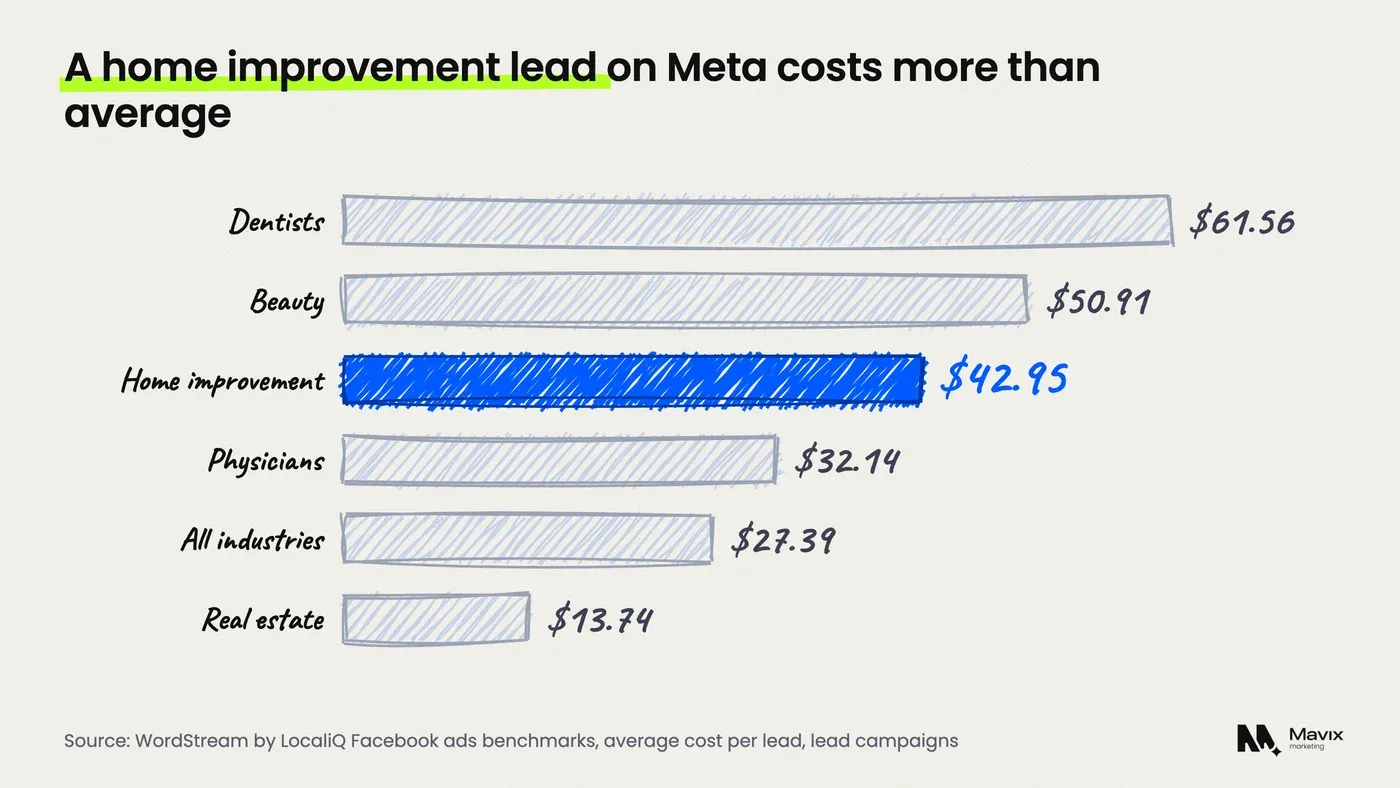
- Meta lead campaigns cost an average $27.39 a lead across 20 industries, and $42.95 for home and home improvement, in WordStream by LocaliQ’s benchmarks.
- An instant form is a form that opens inside Facebook or Instagram with the person’s name, email and phone already filled in. That is why it is cheap and why some leads forget they sent it.
- Meta’s higher intent form type adds a review screen before the form is sent, and it only shows on Facebook and Instagram feeds on mobile.
- Since April 2026, new campaigns can only use Meta’s qualified leads goal if a CRM is connected through the Conversions API.
- Meta keeps instant form leads available to download for 90 days, so a business that downloads by hand can lose leads it paid for.
- Compare the two on cost per booked job: a form with half the lead price wins only if its booking rate is more than half of the landing page’s.
What is the difference between a Facebook lead ad and a landing page?
A Facebook lead ad is an ad that opens a form inside Facebook or Instagram, so the person never leaves the app. A landing page is a page on your own website that the ad sends people to, where they call or fill in your form. The ad can look the same. What changes is where the lead is captured and how much effort it takes to send.
Meta calls the in-app form an instant form, and it can fill in contact details from the person’s profile. That makes it quick on a phone. A landing page asks people to wait for a page to load and type their details, but it also shows them your prices, reviews, photos and service area before they decide.
| Instant form (lead ad) | Landing page | |
|---|---|---|
| Where the lead is captured | Inside Facebook or Instagram | On your website |
| Effort to send | Two or three taps, details prefilled | Page loads, person types or calls |
| Typical cost per lead | Lower | Higher |
| What the person sees first | Your ad and a short intro | Prices, reviews, photos, area |
| Phone calls | Only if you add a call option | Tap to call from the page |
| Tracking needed | Leads sit in Meta until synced | Meta pixel and Conversions API |
The table shows the trade in one line: the form removes effort, and the page adds information. Which of those your buyer needs decides the winner.
Which costs less per lead, a lead form or a landing page?
The instant form nearly always costs less per lead, because it asks for less. WordStream by LocaliQ puts the average Meta lead campaign at $27.39 a lead and an 8.54 percent conversion rate (LocaliQ). Those figures cover lead campaigns of both kinds, so they are a ceiling for forms and a floor for most landing pages.
The trade matters too. The same benchmarks put home and home improvement at $42.95 a lead and dentists at $61.56, against $13.74 for real estate.
Landing pages have their own benchmark. Unbounce’s report on more than 41,000 landing pages found a median conversion rate of 6.6 percent across all industries. It also found that 83 percent of visits were on mobile, and that desktop converted about 8 percent better (Unbounce). If your page is slow or hard to use on a phone, the form’s advantage grows. Our Meta ads cost guide has the full click and lead prices.
Why do instant form leads go cold?
Instant form leads go cold because sending one takes so little effort. Meta’s default form type, which it calls More volume, is built to make it “easy for people to quickly submit the form on a mobile device” (Meta Business Help). Some people tap through while scrolling, and a day later they do not remember your business.
The usual signs, and what each one tells you:
- Wrong or old phone numbers. The number came from the profile, not from the person typing it today.
- “I never filled that in.” The form was sent in two taps with no moment to think about it.
- Price shoppers. The ad promised a quote, and nothing on the form showed a price range.
- Out of area. Nobody asked for a zip code, so leads arrive from towns you do not serve.
None of these means lead ads do not work. They mean the default form is tuned for volume, and a business that needs a phone conversation has to change the settings.
How do you compare a lead form and a landing page fairly?
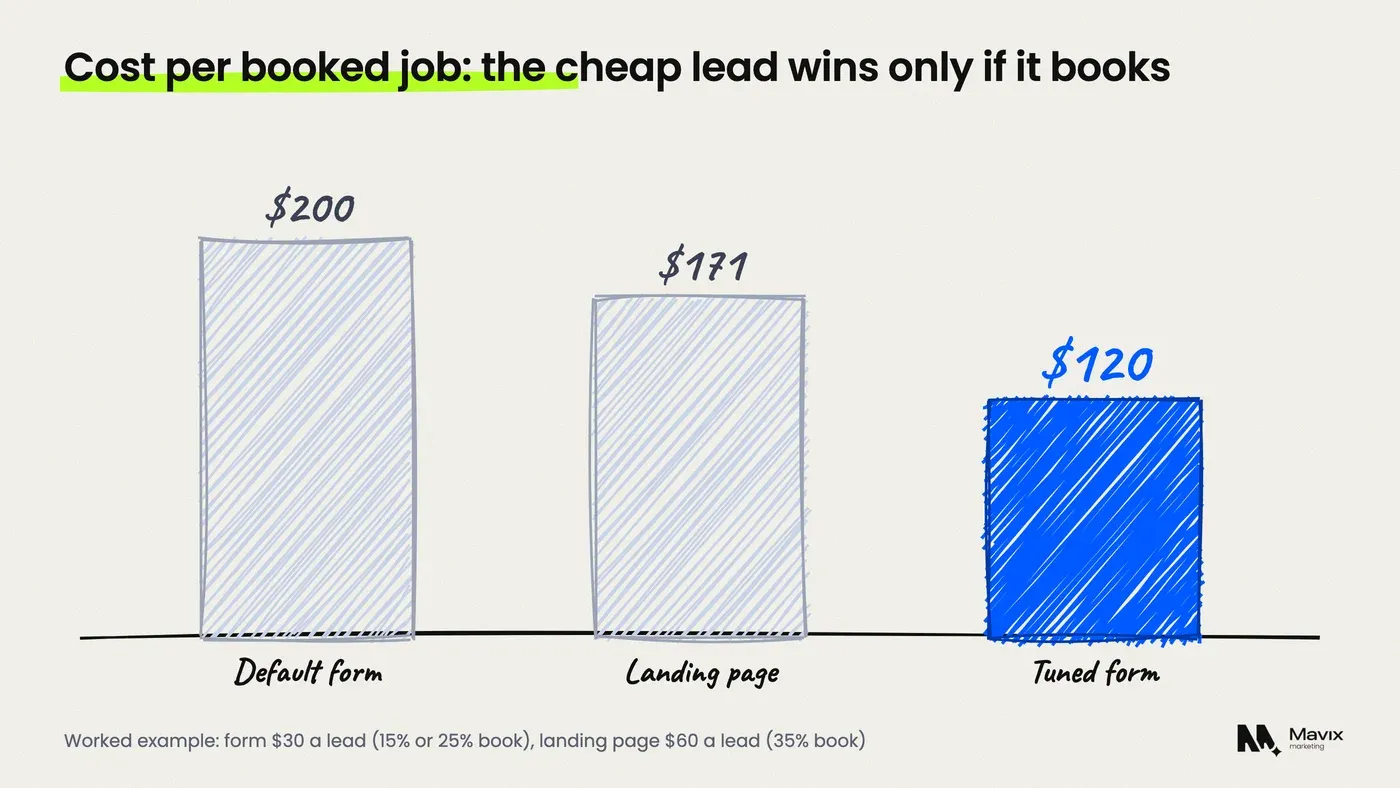
Compare them on cost per booked job: the cost per lead divided by the share of leads that become a booked job. A cheaper lead only wins if enough of those leads book. A form at half the lead price of a landing page beats it only when its booking rate is more than half of the landing page’s booking rate.
A worked example, with a $2,000 monthly budget. The lead prices and booking rates are assumptions for the sum, not benchmarks. Use your own.
| Leads | Booking rate | Booked jobs | Cost per booked job | |
|---|---|---|---|---|
| Instant form at $30 a lead | 66.7 | 15% | 10.0 | $200 |
| Landing page at $60 a lead | 33.3 | 35% | 11.7 | $171 |
| Instant form at $30, higher intent and fast follow-up | 66.7 | 25% | 16.7 | $120 |
The table shows why cost per lead misleads. The plain form brings twice the leads and loses, because too few of them book. The same form with better settings and a call within minutes wins clearly.
To run the comparison, you need every lead and its outcome in one place. A simple lead tracking spreadsheet is enough to start. If Meta and your analytics count different numbers of leads, the post on Meta and GA4 conversion gaps explains why.
Which instant form settings bring better leads?
The settings that raise lead quality are the higher intent form type, a few qualifying questions, and the qualified leads goal. In its help page on instant form types, Meta says higher intent forms add a note that the business may follow up. They also add a review screen where people can confirm their information. Each step adds a little effort on purpose.
- Choose Higher intent under Form type. More volume is the default. Higher intent forms are delivered only to Facebook Feed and Instagram feed on mobile, not desktop.
- Ask one or two qualifying questions. Meta suggests custom questions matched to the goal, such as what product the person wants and when (Meta Business Help). For a trade, that is the job type, the zip code and how soon.
- Put a price range in the intro. A line such as “Most installs cost $4,000 to $7,000” removes people who wanted a $200 job.
- Ask for the best time to call. It gives your team a reason to ring and a time when the person expects it.
- Use the qualified leads goal if your CRM can report back. Meta’s lead ads now offer a goal that shows ads to people “most likely to convert after sharing their contact information” (Meta Business Help).
The last setting has a condition. Meta says that from April 2026 the qualified leads goal is no longer available for new campaigns without a Conversions API integration, and existing campaigns were affected from August 2026. According to Meta, lead ads using that integration with the qualified leads goal on instant forms saw 21 percent lower cost per quality lead than those optimised for the number of leads. Setting it up is covered in the post on the Meta Conversions API for small businesses.
How fast do you need to follow up form leads?
Fast enough that the person still remembers the ad, which in practice means minutes, not days. Meta recommends collecting leads through a connected CRM, because downloading them by hand “can take more time to follow up”. It also suggests running lead ads during the hours your team can respond (Meta Business Help).

There is a hard limit as well. Meta keeps instant form leads available to download for up to 90 days after the form is sent, and after that it does not make them available (Meta Business Help). A business that downloads a spreadsheet once a month is slow and at risk of losing leads it has paid for.
What a working setup looks like:
- Leads go straight to the CRM or a phone alert, through a native integration or Zapier, not a weekly download.
- Ads run only in staffed hours, so nobody waits overnight.
- The first call happens within minutes, followed by a text if nobody answers.
The case for answering first, with the evidence behind it, is in the post on speed to lead.
When does a landing page beat a lead form?
A landing page wins when the buyer needs to see something before they commit: a price, a portfolio, reviews, or proof you cover their area. That fits expensive or considered jobs such as roof replacements, kitchen remodels, implants or legal cases. It also wins when you want phone calls, because a page can carry a tap-to-call button above everything else.
| Situation | Better choice | Why |
|---|---|---|
| Emergency or quick job (drain, lockout, pest) | Landing page with tap to call | People call, they do not fill in forms |
| Big ticket job ($5,000 and up) | Landing page | The buyer wants proof first |
| Free quote or inspection offer | Instant form, higher intent | Low effort, and you call them back |
| Seasonal promotion with a fixed price | Instant form | The price is already in the ad |
| No one free to call within an hour | Landing page | Cold form leads waste the saving |
| Slow or broken mobile website | Instant form, while the page is fixed | The page loses people before they act |
The table shows the pattern. Forms suit simple offers you can follow up fast, and pages suit decisions that need trust. Many accounts run both and keep whichever has the lower cost per booked job after a month.
A landing page only wins if it is built to convert. The post on landing pages for paid ads covers what goes on one, and conversion rate optimisation is the service for fixing a page that loses people. If you would rather someone set up and run the test across forms and pages, that is what our Meta media buying service does.
Where both options fail
Both options fail when nobody follows up, when the offer is weak, or when the tracking cannot tell a booked job from a junk lead. A landing page does not fix slow callbacks, and a form does not fix an ad that promises the wrong thing. Before you switch one for the other, check those three.
- Testing both at once on a tiny budget. Under a few hundred dollars a month, neither side gets enough leads to compare. Test one, then the other.
- Judging after a week. Bookings lag leads. Give each option at least a month of results.
- Counting leads, not jobs. Meta reports leads. Only your records show which ones paid.
Questions people ask about Facebook lead ads and landing pages
Are Facebook lead ads worth it for a small business?
They are worth it when you can call leads back quickly and your offer is simple to say yes to, such as a free quote or a fixed seasonal price. They are a poor fit when nobody can follow up the same day, because the cheaper lead price is lost if the leads go cold. Judge them on cost per booked job after a month.
Do instant forms or landing pages convert better?
Instant forms usually convert a higher share of clicks into leads, because the details are prefilled and the person stays in the app. Landing pages convert fewer clicks, at a 6.6 percent median in Unbounce’s benchmark, but those leads have usually seen your prices and reviews first. The better measure is which one turns more spend into booked jobs.
How do I stop fake or junk leads from Facebook lead forms?
Switch the form type from More volume to Higher intent, add a qualifying question such as zip code or job type, and put a price range in the intro. Those steps add a little effort, which filters out accidental and curious taps. Then connect a CRM so Meta learns which leads became customers.
Can Facebook lead form leads go straight into my CRM?
Yes. Meta supports CRM integrations for lead ads, including a connection through Zapier, so each new lead can reach your CRM, inbox or phone within minutes. Meta recommends it because manual downloads slow follow-up, and because leads are only available to download for 90 days after the form is sent.
What is the qualified leads goal on Meta?
The qualified leads goal is a performance goal for lead ads that shows ads to people Meta expects to become customers, not only to fill in a form. It learns from the lead stages your CRM sends back. Since April 2026 Meta requires a Conversions API integration to use it on new campaigns.
Should I run lead forms and a landing page at the same time?
Run them as separate ad sets only if your budget gives each one enough leads and bookings to judge on its own. If it does not, run one for a month, then the other, and compare cost per booked job. Keep the ad, audience and offer the same so the destination is the only thing that changed.
The bottom line
Do not pick a side on cost per lead. Start with a higher intent instant form if your offer is simple and someone can call within minutes. Use a landing page if your buyer needs proof or tends to phone. After a month, keep whichever has the lower cost per booked job.
If your Meta ads bring leads that never pick up, get your Meta lead ads checked for free. You get a written note on your form settings, follow-up speed and tracking, with the changes that should lower your cost per booked job, usually within one working day.
Free review
Want this looked at on your own site?
Send the address. A person reads it and writes back with the two or three things that would move your enquiry number first. Free, and yours to keep whether you hire us or not.