Performance Max vs Search campaigns for local service businesses: where the money goes, and which to run first
Performance Max or Search for a plumber, roofer or clinic? Where each spends, why cheap PMax leads can cost more per real job, and how to test the two fairly.
For most local service businesses, run a Search campaign first and add Performance Max only once you can track qualified leads, not just form fills. Search shows text ads to people typing your keywords. Performance Max spends one budget across Search, YouTube, Display, Discover, Gmail and Maps, and it chases whatever you count as a conversion, junk included.
This page is for owners of trades, clinics and other local service firms deciding where their Google Ads budget goes. It covers where each campaign type spends, what happens to lead quality and brand searches, when each one wins, and how to test them against each other without guessing.
The short version
- Performance Max is a goal-based campaign that reaches all Google Ads inventory from one campaign: YouTube, Display, Search, Discover, Gmail and Maps, according to Google.
- Google says a Search keyword that exactly matches a person’s query is preferred over Performance Max, so a well-built Search campaign keeps its core searches.
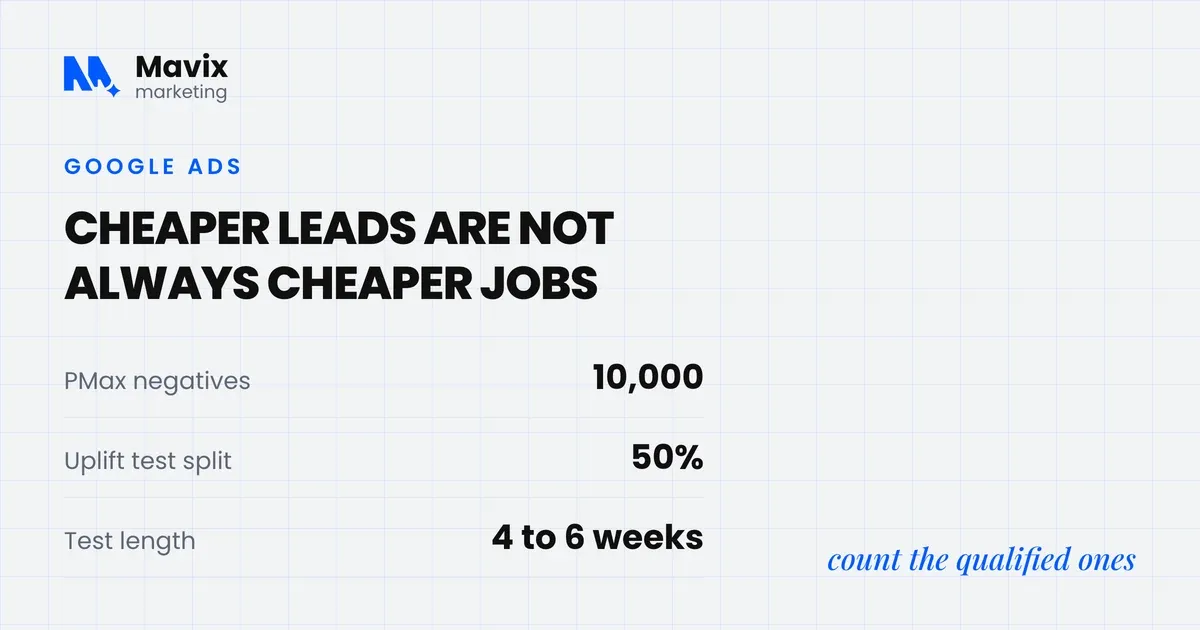
- Since 2025, Performance Max has channel reporting, a full search terms report and up to 10,000 negative keywords per campaign, which removed much of the old blindness.
- Performance Max can report cheaper leads than Search while costing more per real enquiry, because it optimises to whatever you count as a conversion.
- Google’s uplift experiments split traffic 50 percent by default, and Google recommends running experiments for at least 4 to 6 weeks.
What is the difference between Performance Max and Search?
Performance Max is a goal-based campaign type that lets you “access all Google Ads inventory” from one campaign. Google lists YouTube, Display, Search, Discover, Gmail and Maps as its channels (Google Ads Help). A Search campaign shows text ads only on Google search results, for the keywords you choose. You decide what Search buys. Performance Max decides for you.
| Search campaign | Performance Max | |
|---|---|---|
| Where ads show | Google search results, optionally search partners | Search, YouTube, Display, Discover, Gmail, Maps |
| What triggers ads | Your keywords and match types | Your assets, search themes, audience signals and Google’s own choice |
| Control over searches | Keyword by keyword | Negative keywords and brand exclusions only |
| Ad formats | Text ads, plus assets such as calls and sitelinks | Text, image and video, assembled by Google |
| Reporting | Search terms, keywords, every setting | Channel report, search terms report, asset groups |
| Needs to work well | Good keywords and negatives | Accurate conversion data and good creative |
The table shows the trade. Search gives you control and needs your judgement. Performance Max gives Google control and needs your data. For a local business, the data is usually the weak point.
Where does Performance Max spend your budget?
Wherever Google predicts the next conversion is cheapest, which can be YouTube, Display or Gmail as easily as Search. Until 2025 you could not see the split. Google added channel-level reporting and full search terms reporting to Performance Max in 2025, calling channel reporting “a top-requested feature” (Google).
Check the channel performance report in the first month. It shows spend and conversions for Search, YouTube, Display, Discover, Gmail, Maps and search partners. Three patterns are worth acting on:
- Most spend on Search, good conversions. Performance Max is behaving like a broad Search campaign. Compare its search terms with your Search campaign’s.
- Heavy spend on Display or YouTube with many form fills. Check those leads by hand. Cheap inventory that produces many forms and few calls is the classic sign of low-quality or bot submissions.
- Spend on your own brand name in the search terms. Performance Max may be claiming customers who were already looking for you, the subject of the brand section below.
Negative keywords now work properly too. Google raised the limit from 100 to 10,000 negative keywords per Performance Max campaign in 2025 (Google Ads). The starting list for trades is in our post on negative keywords for home services.
Which gets better lead quality for a local service business?
Search, in most accounts that only count form fills and calls, because Performance Max optimises towards whatever conversion you give it and finds the cheapest places to get more of it. Google’s own lead quality guidance tells advertisers to optimise for qualified or converted leads. It also says to add verification such as reCAPTCHA, double opt-in or server-side checks “to ensure lead authenticity” (Google Ads Help).
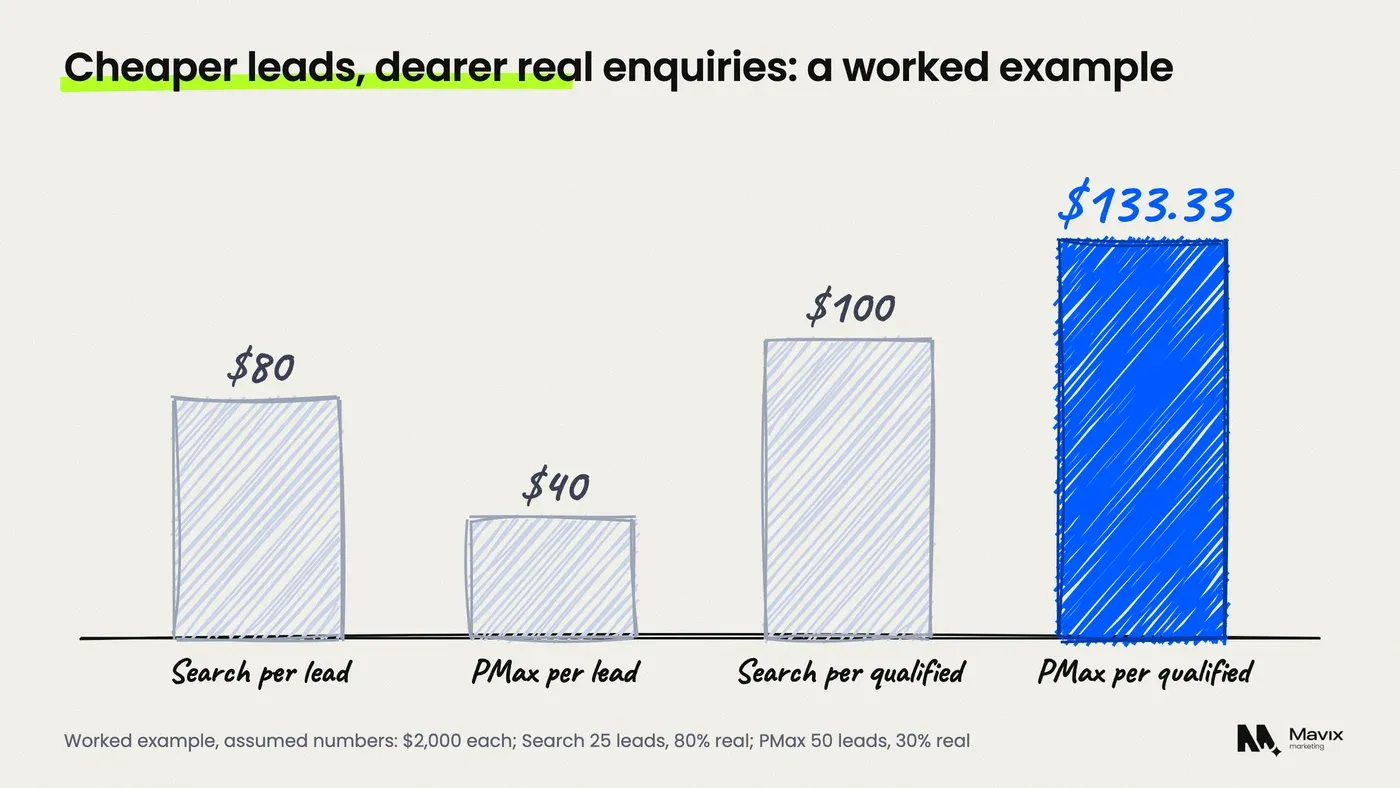
A worked example, with assumed numbers, shows why cost per lead misleads. Both campaigns spend $2,000 in a month.
| Search | Performance Max | |
|---|---|---|
| Spend | $2,000 | $2,000 |
| Leads reported | 25 | 50 |
| Cost per lead | $80 | $40 |
| Share that are real enquiries | 80% | 30% |
| Qualified leads | 20 | 15 |
| Cost per qualified lead | $100 | $133.33 |
The table shows Performance Max winning on the number in the dashboard and losing on the number that pays wages. Your own shares will differ. The point is that you cannot compare the two until you mark which leads were real.
The fix is the same for both campaign types: tell Google which leads became jobs. Google recommends enhanced conversions for leads, which matches your lead records back to the ad click, and target cost per acquisition bidding on qualified or converted leads. Until that is in place, Performance Max is optimising to the wrong target. If clicks arrive and real enquiries do not, start with why Google Ads clicks turn into no leads.
Does Performance Max take credit for your brand searches?
It can. People who search your business name were already on their way to you, and those clicks convert cheaply. If Performance Max serves on them, its results look better than the new customers it actually found. Google’s answer is brand exclusions. Its Performance Max guidance says “campaign-level brand exclusions are a better option for blocking brand traffic”. You set them up by adding your brand to a brand list (Google Ads Help).
Two steps keep the numbers honest:
- Run a separate Search campaign for your business name, with exact match keywords. Google says a Search keyword that exactly matches the query “will be preferred over Performance Max” (Google Ads Help).
- Add your brand to a brand list and exclude it from Performance Max.
Then judge Performance Max only on non-brand results. That is the number that tells you whether it found customers you would not have had.
When does Search win, and when does Performance Max win?
Search wins when the budget is small, the services are specific and every lead must be a real job, which describes most trades. Performance Max wins when conversion tracking reports real outcomes, the account has steady conversion volume, and you can supply strong images and video. Google’s Performance Max guidance says the system “learns faster and makes better predictions with more data and performance history”.
| Your situation | Run first | Why |
|---|---|---|
| Under about $2,000 a month | Search | Too few conversions for Performance Max to learn from |
| Only counting form fills, not booked jobs | Search | Performance Max will chase cheap, low-quality forms |
| Emergency calls are the main job | Search | Keyword control matters most when intent is urgent |
| Qualified leads imported from your CRM | Test Performance Max | It can now optimise to real outcomes |
| Good photos and video of your work | Test Performance Max | YouTube and Display placements need creative |
| Search campaign limited by budget | Fix Search first | A limited Search campaign may not serve, letting Performance Max take its queries |
The table shows that Performance Max is a second step, not a starting point, for most local service firms. Our guide to Google Ads on a small budget covers the Search setup to build first, and our Google Ads service runs that setup for trades that want it done for them.
How do you test Performance Max against Search fairly?
Use Google’s uplift experiment and judge the result on cost per qualified lead, not cost per lead. Google says uplift experiments “measure the uplift or incremental benefit of using Performance Max with your existing Search, Video, and Display campaigns”. The traffic split is 50 percent by default (Google Ads Help).
- Fix tracking first. Count calls over a minimum length and forms, and import which ones became qualified leads. The Google Ads call tracking guide shows how.
- Protect the core. Keep your Search campaign with exact match keywords for your main services and your brand.
- Exclude the brand from Performance Max with a brand list.
- Add your negative keyword list to Performance Max before launch.
- Run the uplift experiment. Google’s experiments FAQ recommends “at least 4-6 weeks or longer if you have a long conversion delay”. It also says the first 7 days of data are discarded for ramp-up (Google Ads Help).
- Compare cost per qualified lead and cost per booked job. Count leads in your own records, not only in the Google Ads dashboard.
If the account cannot produce enough conversions in six weeks to tell the two apart, that is the answer: stay on Search.
Where Performance Max goes wrong for local businesses

Performance Max is not a bad campaign type. It is one that does exactly what it is told, and local businesses often tell it the wrong thing.
- A form fill counted the same as a booked job. The system buys more form fills, from wherever they are cheapest.
- Thin creative. Without your own photos and video, the ads on YouTube and Display look generic, and the system leans on whatever it can assemble.
- Location settings left wide. Like Search, a loose location setting buys clicks from outside the area you serve. The Google Ads location setting post explains the one to change.
- Judging it in week two. Changes during learning reset the clock. Set the test length in advance and leave it alone.
- Switching off Search to fund it. That removes the comparison and the keyword control at once.
Questions people ask about Performance Max vs Search
Can I run Performance Max and Search at the same time?
Yes, and most accounts that use Performance Max do. Google’s rule is that a Search keyword exactly matching the query is preferred over Performance Max. Where there is no exact match, the campaign with the higher Ad Rank serves. Keep your most important searches as exact match keywords in Search so you control the ad, the landing page and the bid for them.
Do Performance Max ads show on Google Maps?
Yes. Google lists Maps among the Performance Max channels, alongside Search, YouTube, Display, Discover and Gmail. For a local business that is one of its real advantages over Search. Link your Google Business Profile to the account so location information can show with the ads.
Can I see search terms in Performance Max now?
Yes. Google rolled out a full search terms report for Performance Max in 2025, giving it the same level of search reporting detail that Search and Shopping campaigns have. Find it under Insights and reports, in the search terms report view for Performance Max. Add irrelevant terms as negative keywords, and add your brand to a brand list.
How much budget does Performance Max need?
Google does not publish a minimum. It says more conversion data helps the system learn faster, and advises checking that the campaign is not budget constrained. For a local service business, a budget that produces only a handful of qualified leads a month gives it little to learn from. That is why the decision table above puts Search first under about $2,000 a month. The same data problem limits smart bidding in small accounts.
Should a plumber or roofer use Performance Max for calls?
Only after calls are tracked with a minimum duration and you can tell booked jobs from wrong numbers. Urgent calls come mostly from search, where Search campaigns give keyword control, which is how our Google Ads for plumbers setup is built. Performance Max can add calls from Maps and other placements, but test it with an uplift experiment rather than replacing the Search campaign. The Local Services Ads comparison covers the other pay-per-lead route.
Is Performance Max cheaper than Search?
It often reports a lower cost per lead, because it buys cheaper inventory such as Display and YouTube. Whether it is cheaper per real job depends on lead quality. In the worked example on this page, Performance Max costs half as much per lead and a third more per qualified lead. Judge it on your own qualified lead numbers.
The bottom line
Build a tight Search campaign first, with exact match keywords for your main services and your brand. Add Performance Max only when your tracking tells Google which leads became jobs. Then test it with an uplift experiment for at least six weeks, and keep it only if it lowers your cost per qualified lead.
If you are not sure whether your Performance Max spend is finding new customers or buying your own brand, get your Google Ads account checked for free. You get your cost per qualified lead by campaign and the brand traffic each one is claiming, usually within one working day.
Free review
Want this looked at on your own site?
Send the address. A person reads it and writes back with the two or three things that would move your enquiry number first. Free, and yours to keep whether you hire us or not.