
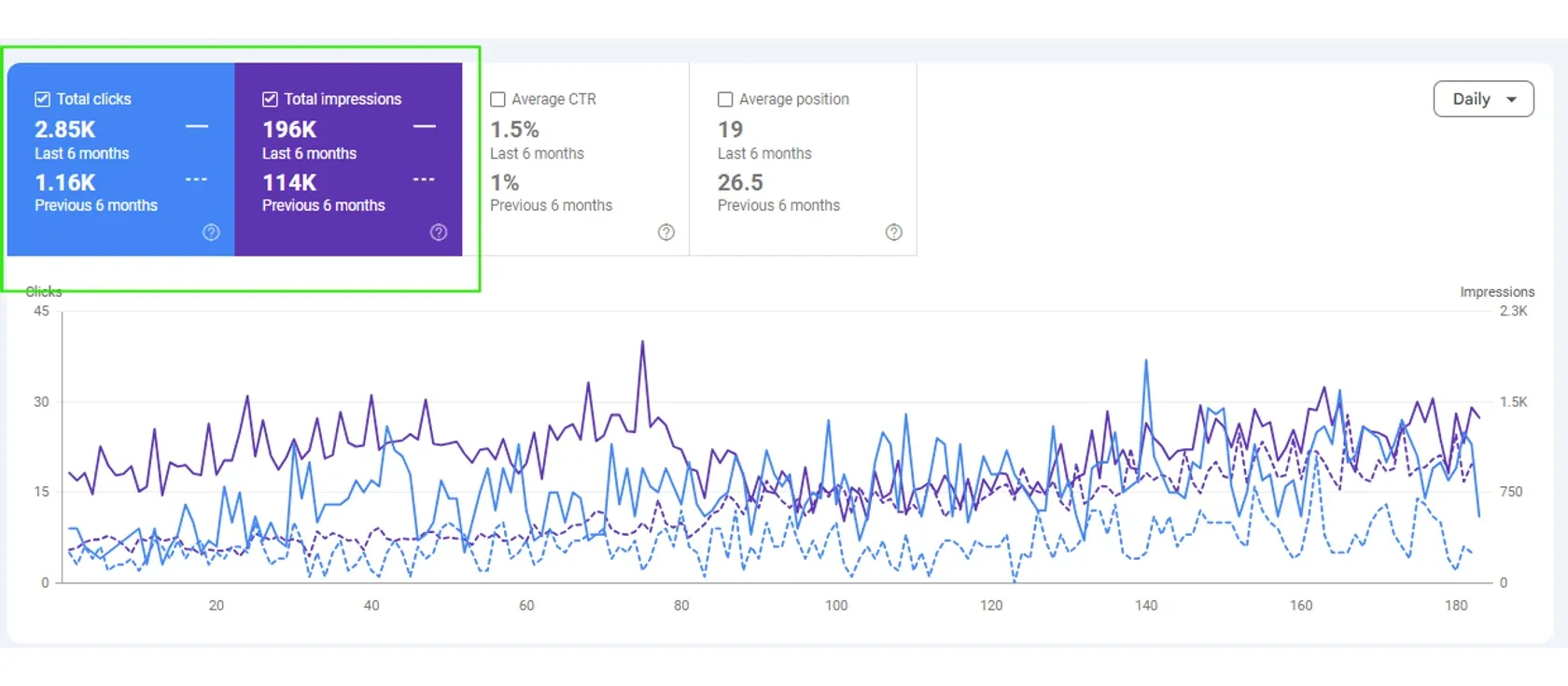
La Vela CoffeeSEO
+146%organic clicks
- 2.85Kclicks, from 1.16K
- 196Kimpressions, from 114K
- 19average position, from 26.5
Ecommerce Google Ads
Your Shopping ads show a blue kettle for a search that wanted a red one. The price in the ad is last week's. Merchant Center has disapproved 300 products and nobody has opened the report. The bids are fine. The product data behind them is what needs work.
Or call +1 (510) 312-5086 Mon to Sat, 9:00 to 18:00 ET
Free, written by a person, yours to keep either way.
Certified across the platforms we buy on. 150+ businesses, 7 years.






A plumber picks keywords. A store mostly does not. Google’s help page says Shopping ads use your Merchant Center product data, not keywords, to decide how and where to show your ads (about Shopping ads). The product title, category and identifiers you send are what Google matches against a search.
So a store has two kinds of campaign. Shopping ads, with a photo and a price, answer product searches. Text ads on the search results answer category searches such as “office chairs for tall people”, where you choose the words and the landing page. The ecommerce and retail marketing page explains why both should be priced on margin. This page covers what each one needs before it can work.
Merchant Center is the Google account that holds your product list, called the feed. Its specification names the data every product must carry (Merchant Center product data specification).
| Attribute | The rule | What goes wrong in a store |
|---|---|---|
| id | Unique, up to 50 characters | IDs change after a replatform and history is lost |
| title | Up to 150 characters | Supplier codes instead of the words shoppers type |
| description | Up to 5,000 characters | Left blank or copied across variants |
| link | The product’s landing page | Points at a page that redirects |
| image link | Main product image | A broken or missing image URL |
| price | Must match the landing page and checkout | Sale ends on the site and the feed still shows it |
| availability | Must match the landing page and checkout | Sold-out items still advertised |
| brand | Required for new products, with listed exceptions | Store name used in place of the maker |
| gtin | Recommended where the manufacturer assigned one | Missing, or made up |
On the last row, Google says products with a missing or incorrect GTIN may have limited visibility. A GTIN is the barcode number, such as a UPC.
Policy sits on top of data. Google’s Shopping ads policies list misrepresentation among prohibited practices, and say Google may disapprove listings and suspend accounts for repeat or egregious violations (Shopping ads policies).
In one retail Google Ads account we worked on, the conversion action was counting page views instead of orders. Every decision in the account was being made on that number. The tracking was fixed in week one, before anything else was touched.
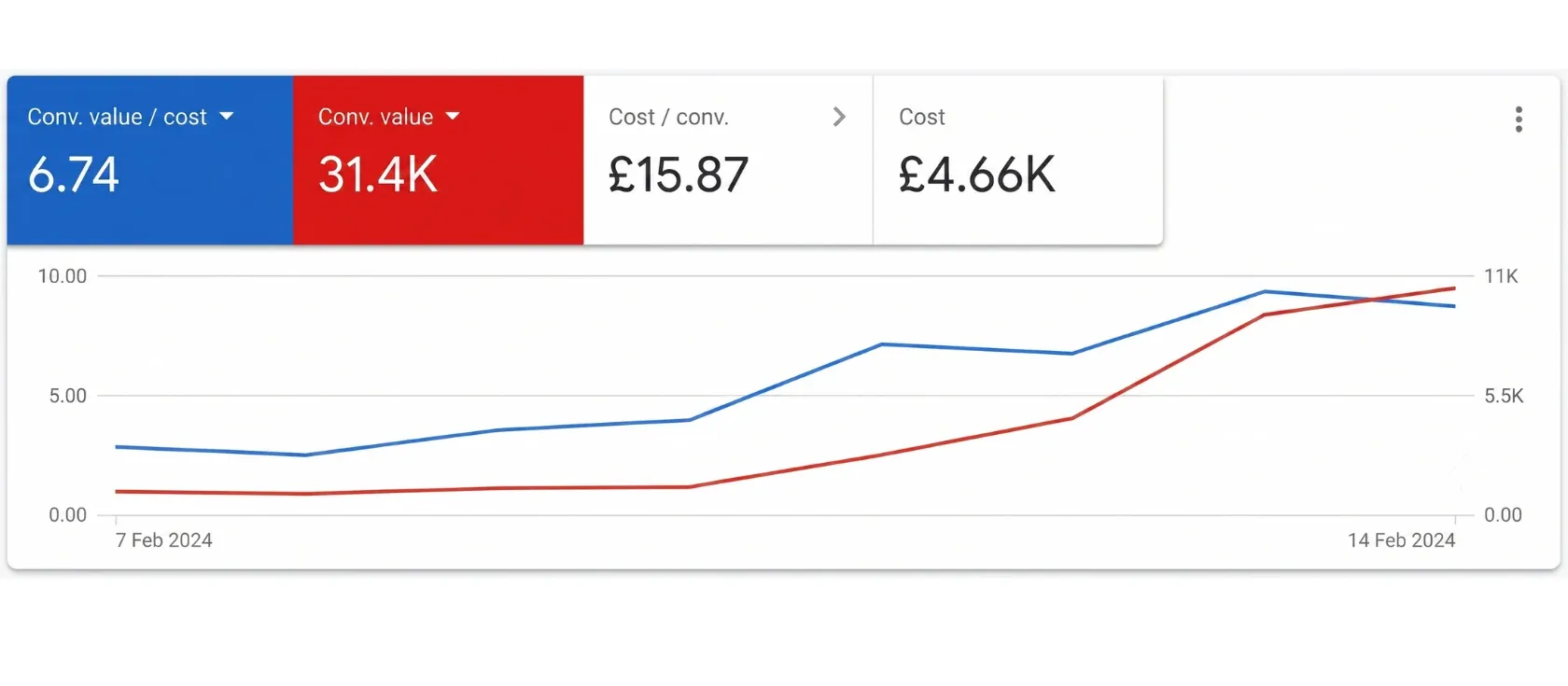
The screenshot we publish shows £31.4K in conversion value from £4.66K of spend, at £15.87 per conversion. That is a return of 6.74 times. The window is 7 to 14 February 2024, eight days, so read it as a snapshot and not a sustained figure.
Conversion value is revenue, not profit. Whether 6.74 times is good depends on that store’s gross margin, which the screenshot does not show. The full record is in the retail Google Ads case study.
Week one. Order tracking is tested with a real purchase. The value sent to Google must equal the order total you see in the store. Our conversion tracking guide lists what to test.
Weeks two to four. The feed is repaired: titles rewritten in shopper language, disapprovals cleared, identifiers added. Products are grouped by margin band, using figures you supply.
Month two. Shopping campaigns run per margin band, each with its own target. Brand searches are moved to their own campaign. Search campaigns start on the category terms with a real landing page behind them.
Month three. You get spend, revenue and estimated margin by product group. Products that take clicks and never sell are excluded or fixed on the page.
LocaliQ’s 2026 benchmarks report these averages for search campaigns (LocaliQ search advertising benchmarks):
Two cautions. These are text ads on search, so they say little about Shopping ad clicks. And the report counts leads, where a store counts orders. Use them for scale only.
Google charges Shopping campaigns per click, when someone clicks through to your product page (about Shopping ads). Your own ceiling comes from margin. If a product leaves $30 after cost and shipping, that is the most an order from ads can cost before you lose money on it. The Google Ads return calculator runs that sum.
Mavix gives no management price here. We quote after a free review of the account and the feed. See the ads pricing page for how the fee is set.
Our rule of thumb: under a few dozen orders a month, automated bidding has little to learn from. Start narrow, with your best sellers.
If margin after shipping is thin, paid clicks may never pay. Work on repeat orders first, through email marketing for ecommerce.
If category pages are empty, text ads will land on a bare grid. Fix those pages under ecommerce SEO services and both paid and organic visitors benefit.
Already spending and unsure the numbers are real? Give us read access. We will review the Google Ads account and check the order tracking first. The Google Ads audit checklist shows what we look at.
Proof
Two online stores: one selling commercial coffee equipment, one retail account on Google Ads.
La Vela CoffeeSEO
+146%organic clicks
Google Ads, retailMedia buying
6.74xreturn on ad spend
Questions
Next step
A written review of your search, ads and follow-up, by a person. You keep the document whether you hire us or not.
Free review
A 50% increase in 90 days, or you get a refund plus $1,000. Yours to keep whether you hire us or not.