Google Ads getting clicks but no leads? The 11 causes, in the order to check them
Paying for Google Ads clicks that never call or fill in a form? The 11 causes, in the order to check them, and how to test each in minutes.
Google Ads clicks with no leads almost always come from one of eleven causes, and the first to rule out is tracking, because a broken tag makes every other number wrong. After that, check who is clicking (search terms, bidding, networks, location), then what they land on (page, form, offer), then whether anyone answers the phone.
This page is for owners of local service businesses and small stores whose Google Ads account shows clicks and spend but a quiet phone. It gives the eleven causes in the order to check them, where each check lives in the account, and the number of clicks after which zero leads stops being bad luck.
The short version
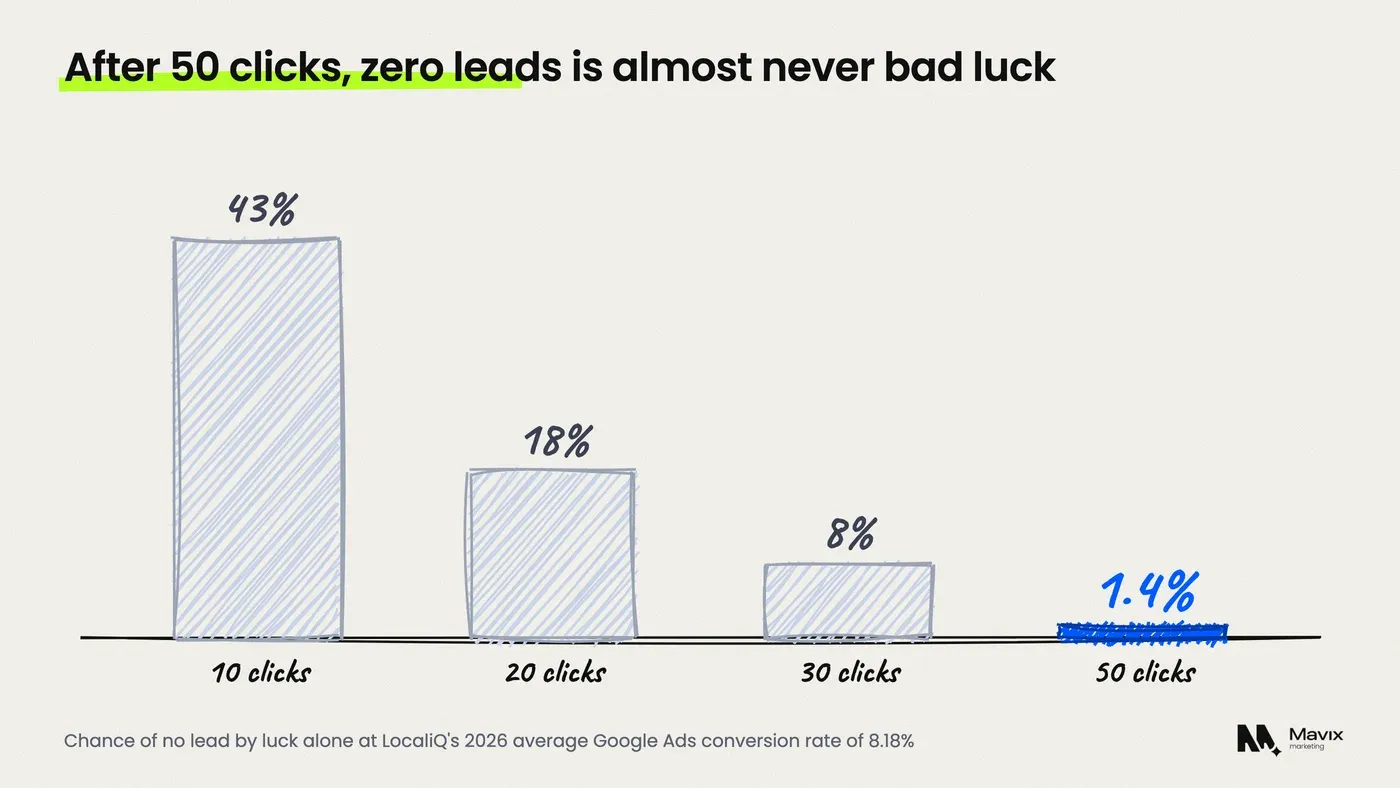
- At LocaliQ’s 2026 average Google Ads conversion rate of 8.18 percent, about 18 in 100 runs of 20 clicks would bring no lead by chance alone. Fifty clicks with none happens only about 1.4 times in 100.
- Check tracking first. Google Ads shows a “Misconfigured” status when conversions have stopped recording because of a setup error or broken tag.
- Calls from ads count as conversions only when call reporting is on, and Google’s default counts a call only once it passes 60 seconds.
- The default location option, Presence or interest, can show your ads to people who are only interested in your area, not in it.
- If tracking, traffic and the page all check out, the last two causes are the offer and the phone: price, proof and answered calls.
What causes Google Ads clicks with no leads?
Eleven causes account for most accounts that get clicks and no enquiries. They fall into four groups: the account is not counting leads, the wrong people are clicking, the page loses the right people, or the business loses them after they call. The table lists them in the order to check, so the quick checks that rule out the most come first.
| # | Cause | Where to check | Time |
|---|---|---|---|
| 1 | Conversion tag missing or broken | Goals, Conversions, Summary: the status column | 5 min |
| 2 | Calls not counted as conversions | Account settings, Call reporting; conversion actions | 5 min |
| 3 | Leads counted on the click date | Add the “Conv. (by conv. time)” column | 2 min |
| 4 | Search terms that will never buy | Insights and reports, Search terms | 15 min |
| 5 | A bid strategy that buys clicks, not leads | Campaign settings, Bidding | 2 min |
| 6 | Search partners or Display switched on | Campaign settings, Networks | 2 min |
| 7 | Ads shown outside the area you serve | Campaign settings, Locations, Location options | 5 min |
| 8 | A landing page that hides the next step | Open the ad on your own phone | 10 min |
| 9 | A form that breaks or emails nobody | Send a test enquiry | 5 min |
| 10 | An offer weaker than the ad beside yours | Search your own keyword | 10 min |
| 11 | Calls that ring out or go to voicemail | Report editor, Call details | 10 min |
The table shows that the first seven checks happen inside the account and take about half an hour together. Only the last four need you to look at the business from the customer’s side.
How many clicks with no leads before something is wrong?
About 40 to 50 clicks without a single lead is the point where bad luck stops being a likely explanation. That rests on LocaliQ’s 2026 search benchmarks, which put the average Google Ads conversion rate at 8.18 percent (LocaliQ). A conversion rate is the share of clicks that become a call or a form.
The arithmetic, assuming each click has the same 8.18 percent chance and clicks are independent:
- 10 clicks with no lead: happens about 43 times in 100 by chance.
- 20 clicks with no lead: about 18 times in 100.
- 30 clicks with no lead: about 8 times in 100.
- 50 clicks with no lead: about 1.4 times in 100.
At LocaliQ’s average $5.42 a click, 50 clicks cost about $271. So a quiet first week on a small budget proves little, while a quiet month at a few hundred dollars says something is broken. If your trade converts below the average, as LocaliQ’s 5.55 percent for attorneys does, allow more clicks before you judge.
Is your conversion tracking actually counting leads?
Check this before anything else. If the tag is missing, every report says “no leads” even when the phone rings. Google’s troubleshooter lists a “Misconfigured” status for conversion actions that have stopped recording because of a setup error or broken tag. It lists “Awaiting conversions” when nothing has been recorded in seven days (Google Ads Help).
Cause 1: the tag is missing or broken. Open Goals, then Conversions, then Summary, and read the status of each conversion action. A recent website rebuild or a new form plugin is the usual reason a working tag disappears. Send yourself a test form from an ad click and see whether it appears the next day.
Cause 2: calls are not counted. Most local service leads are phone calls. Calls from the call button in an ad are logged under the “Calls from ads” action only after call reporting is enabled in account settings. Google’s default counts a call once it lasts 60 seconds (Google Ads Help). A one-minute rule can miss short calls that book a quote. Calls to the number on your website need their own website call conversion.
Cause 3: leads land on the click date. The standard Conversions column reports a lead on the date of the ad click, not the date the lead arrived (Google Ads Help). Someone who clicks on Monday and calls on Thursday shows up against Monday. Add the “Conv. (by conv. time)” column before deciding a recent week was empty.
For the full setup in order, use the tracking setup checklist.
Are the clicks coming from people who want to buy?
Often not, and the search terms report shows it. It lists the real searches that triggered your ads, though Google leaves out low-volume searches for privacy reasons, so it never shows every click (Google Ads Help). Sort it by cost and read the top 50 lines.
Cause 4: search terms that will never buy. Broad keywords pull in job seekers, DIY searches, parts buyers and people looking for a competitor by name. For a plumber, “plumber salary” and “how to fix a leaking tap” are clicks with no customer behind them. Add each one as a negative keyword, a word that stops your ad showing. The post on negative keywords for home services has a starting list.
Cause 5: a bid strategy that buys clicks. Maximize clicks does what its name says: it sets bids to get as many clicks as your budget allows, whoever is clicking. Once conversions are tracked, a strategy that bids for conversions is usually the better fit.
Cause 6: search partners or Display switched on. Search partners are included by default in a new Search campaign (Google Ads Help). Segment the campaign by network to see what partner sites and Display cost you, and switch them off if they bring clicks and no leads.
Are your ads showing outside the area you serve?
They may be, because of a setting most owners never open. The default location option, Presence or interest, reaches people in or regularly in your area and also people who have shown interest in it, according to Google’s advanced location options page. Someone in another state researching your city can see an ad for a service you cannot deliver to them.
Cause 7: the wrong location option. Open the campaign settings, then Locations, then Location options, and choose Presence, which targets people who are located or regularly located in your area. Then check the “Locations” report for where clicks actually came from. Google notes location signals are best effort, so some stray clicks will still get through.
Say a $3,000 month sends one click in four to people outside your area. That is $750 a month buying clicks that cannot become jobs. The plan post on Google Ads location targeting covers radius, exclusions and service areas.

Does the landing page make the next step obvious?
If the right people click and still do not call, the page is the next suspect. Open your own ad on your own phone, on mobile data, and time how long it takes to find the phone number and tap it. If it takes more than a couple of seconds, or you have to scroll past a banner and a mission statement first, a stranger in a hurry will not wait.
Cause 8: a page that hides the next step. The usual faults are an ad that sends every click to the homepage and a phone number that is an image and cannot be tapped. Others are a page that talks about the company before the service, and no price guide or service area. The page should repeat the promise in the ad in its first line. The plan post on a landing page for Google Ads sets out the layout.
Cause 9: a form that breaks or emails nobody. Forms fail quietly. A plugin update breaks the submit button, or enquiries go to an old inbox or a spam folder. Send a test enquiry from your phone every month and check it arrives where someone reads it. The conversion audit checklist covers thirty more places enquiries leak.
Is the offer losing to the ad next to yours?
Sometimes the account and page are fine and the customer simply picks someone else. Search your own main keyword from inside your service area and read every ad and map listing on the page. Compare what they promise against yours: price shown, same-day availability, review count, guarantee, financing.
Cause 10: a weaker offer. If three competitors show “no call-out fee” and 400 reviews, and your page shows neither, the clicks that compare will leave. You do not need to match every promise. You need one clear reason to call you, stated in the ad and repeated on the page.
| What the searcher compares | What wins the call |
|---|---|
| Price | A starting price or a clear “free quote” |
| Speed | “Today” or a real response time |
| Trust | Review count and rating, licence number |
| Risk | A guarantee in plain words |
The table shows the four things a searcher weighs in the few seconds between ads. The one your page is missing is usually the one to add first.
Are calls from the ads being answered?
Unanswered calls are leads you paid for and lost. The call details report shows each call from your ads with its start time, duration, caller area code and whether it was missed or received (Google Ads Help). Find it under Insights and reports, Report editor, then Call details.
Cause 11: calls that ring out. Look for missed calls bunched at lunch, early morning or after 5 pm. Then either schedule ads to the hours someone picks up, or put an answering service on the line. Count short calls too: a 20-second call that hangs up after three rings is a customer who rang the next number. The plan post on missed calls and what they cost works through the money.
If you would rather have all eleven checked at once, a Google Ads management review starts with exactly this list.
When the problem is not inside Google Ads
Some businesses will not get cheap leads from search ads whatever is fixed. If your average job is small, your area has few searches, or the service is something people rarely search for, the numbers may never work. A $600 job that needs a 1 in 2 booking rate can only carry a modest cost per lead.
- Too little budget for the click price. A $20 a day budget in a trade with $10 clicks buys two clicks a day, so a month barely passes the 50-click line.
- A brand-new site with no reviews. Searchers who compare tend to pick the listing with proof, so build reviews before you scale spend.
- A seasonal service out of season. Clicks in the off-season tend to be researchers, not buyers.
When the account is clean and the numbers still fail, money may work harder on the map listing first. Local SEO wins calls without a cost per click, and the full Google Ads audit checklist helps you decide which one to fund.
Questions people ask about Google Ads clicks with no leads
Why does Google Ads say conversions but I have no leads?
Usually because the account counts something that is not a lead. Page views, clicks on a phone number, or a visit to a thank-you page that anyone can reach all inflate conversions. Open Goals, then Conversions, and check which actions are set as primary, because those are the ones in the Conversions column and the ones automated bidding chases.
How long should I wait before changing a new Google Ads campaign?
Wait until it has enough clicks to judge, not a set number of days. At an 8.18 percent conversion rate, 50 clicks with no lead happens by chance only about 1.4 times in 100. Fix tracking faults straight away, but leave keywords and bids alone until the campaign has passed that point.
Can click fraud explain clicks with no leads?
It can explain some of them, but it is rarely the place to start. Before blaming fraud, check the search terms report and the location report, because irrelevant searches and out-of-area clicks look exactly like fraud and are far easier to fix. Add the invalid clicks column to the campaign table to see what Google has already filtered.
Is a low conversion rate the ads or the website?
Read the search terms first. If the searches are relevant and in your area, the problem is the page, the offer or the phone. If the searches are wrong, the ads and keywords are the problem and no page will fix them. Test the page by calling from it on your own phone, and the offer by reading the ads beside yours.
Should I turn off my Google Ads if I get no leads?
Not before running the eleven checks. Turning ads off loses the data you need to fix them, and most causes are settings that take minutes to change. Pause only the keywords or campaigns with high spend and no relevant search terms, keep the rest running, and judge the account again after another 50 clicks.
Do Google Ads calls count as conversions automatically?
No. Calls from ads are counted under “Calls from ads” only after call reporting is turned on in account settings, and by default a call counts once it lasts 60 seconds. Calls to the number on your website need a separate website call conversion action, set up with a Google forwarding number on the page.
The bottom line
Do not raise the budget or change the bidding until tracking is proven with a test lead. Then read the search terms, fix the location option, and test the page and the phone yourself. If all eleven checks pass and fifty more clicks still bring nothing, the offer or the market is the problem, not the ads.
If your ads get clicks but the phone stays quiet, get your Google Ads account checked for free. You get a written list of which of the eleven causes are costing you money, usually within one working day.
Free review
Want this looked at on your own site?
Send the address. A person reads it and writes back with the two or three things that would move your enquiry number first. Free, and yours to keep whether you hire us or not.