Why are my emails going to spam? Eight checks to run in order, and the fix for each
Emails landing in spam? Run these eight checks in order: headers, SPF, DKIM, DMARC, complaint rate, list hygiene, content and volume, with the fix for each.
Most business emails land in spam for one of three reasons. The domain is not authenticated with SPF, DKIM and DMARC, too many recipients press “report spam”, or the list holds old and unconfirmed addresses. Gmail’s rules say every sender needs SPF or DKIM and a spam rate under 0.3 percent, and bulk senders need all three records.
This page is for owners and managers whose newsletters, quotes or invoices are being missed. It gives eight checks in the order that finds the cause fastest, starting with free evidence already sitting in your inbox, and the fix for each one.
The short version
- Gmail requires every sender to set up SPF or DKIM and keep the spam rate below 0.3 percent; senders of more than 5,000 messages a day also need DMARC and one-click unsubscribe.
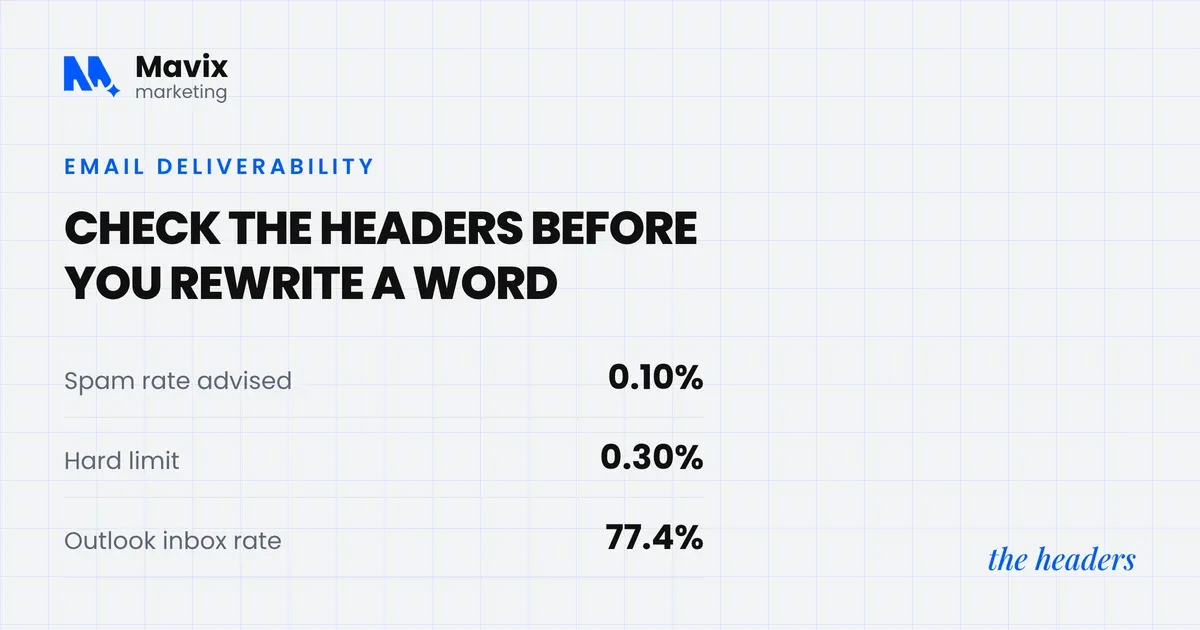
- Google advises keeping the spam complaint rate below 0.10 percent and never reaching 0.30 percent. On 5,000 emails, that is 5 complaints, and 15 is the hard line.
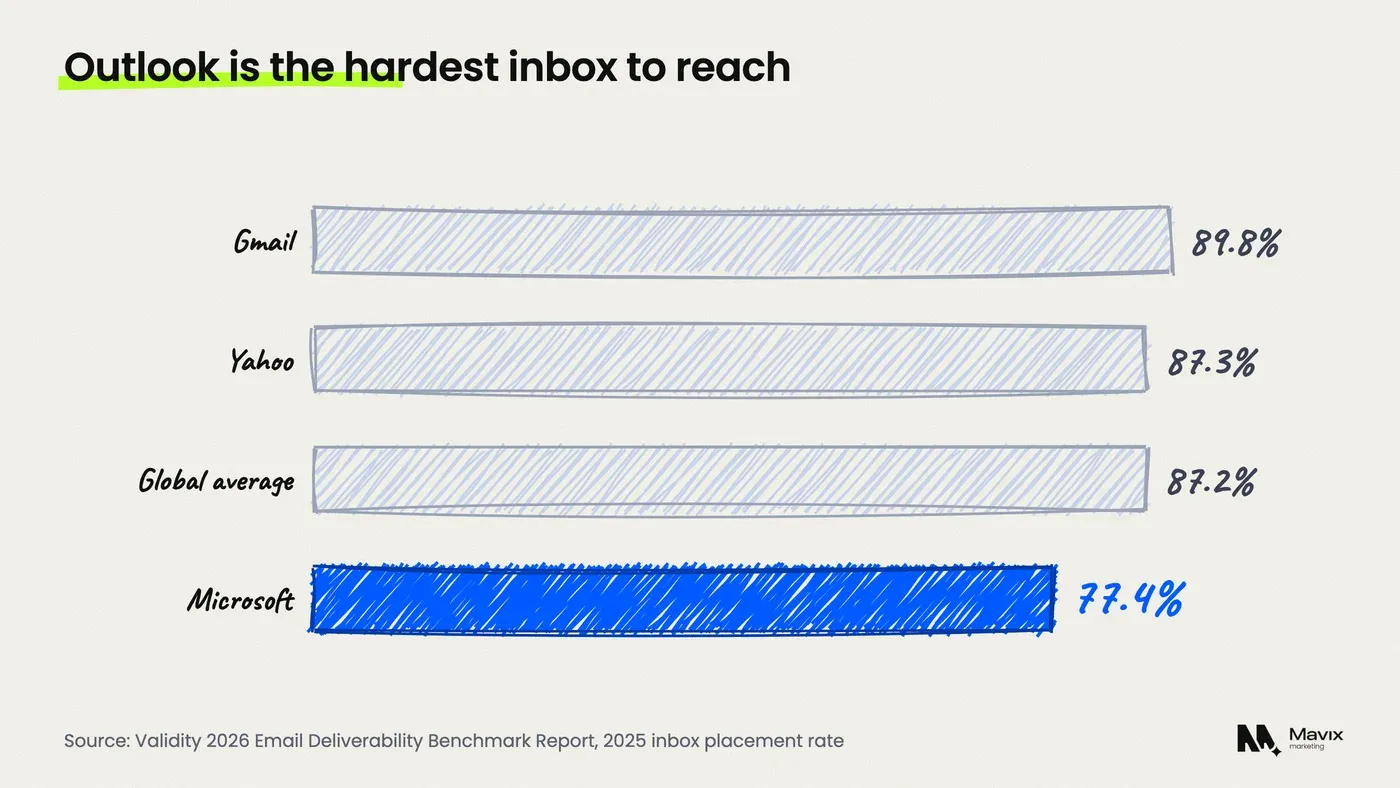
- Microsoft was the hardest inbox to reach in 2025, with 77.4 percent inbox placement against 89.8 percent at Gmail, according to Validity’s 2026 benchmark report.
- Google can delete personal accounts after two years of inactivity, so an old list collects dead addresses that bounce and hurt your reputation.
- Check in this order: headers, authentication, complaint rate, list, content, volume. Content is rarely the first cause, so it comes late.
Why are my emails going to spam?
Your emails go to spam because the receiving inbox does not trust the sender, the content or the recipient’s interest in it. Gmail’s sender guidelines name the main triggers. They are missing authentication, a spam complaint rate at or above 0.3 percent, and mail sent to people who did not ask for it (Google, Email sender guidelines). Most cases are one of those three.
A spam folder is a decision the mailbox provider makes about each message, using who sent it, whether it proves it came from your domain, and how people reacted to your past emails. Those are the things to check, and in roughly that order. Wording in the subject line matters far less than most advice suggests.
How often do emails land in spam?
About one email in eight missed the inbox globally in 2025. Validity’s 2026 benchmark report, built from seed addresses its customers use to test campaigns, put the average inbox placement rate at 87.2 percent (Validity). The rest went to spam or never arrived.
| Mailbox provider | Inbox | Spam folder | Missing |
|---|---|---|---|
| Gmail | 89.8% | 6.4% | 3.8% |
| Yahoo | 87.3% | 6.4% | Not stated |
| Microsoft (Outlook, Hotmail) | 77.4% | 15.1% | 7.5% |
The table shows why “it reached my Gmail” is not proof. Microsoft sent more than twice the share of mail to spam that Gmail did. If your customers are businesses on Outlook, test there first.
What is the right order to test spam problems?
Test from the cheapest evidence to the most work: the headers of one email, then your DNS records, then the complaint rate, then the list, then content and volume. Each step either finds the cause or rules it out, so you never rewrite a newsletter when the real problem was a missing DNS record.
- Send a test to yourself at a Gmail, an Outlook and a Yahoo address. Note which folder each lands in.
- Read the headers of the copy that went to spam.
- Check SPF, DKIM and DMARC for every service that sends as your domain.
- Check your complaint rate in Google Postmaster Tools and Yahoo’s Sender Hub.
- Check blocklists for your domain and sending IP.
- Clean the list: bounces, old contacts, bought or scraped addresses.
- Check content and links.
- Check volume: sudden jumps, a new domain, irregular sends.
The sections below take each check in turn.
How do you read an email’s headers?
Headers are the hidden record of how a message travelled and whether it passed its checks. In Gmail on a computer, open the email, click More next to Reply, then Show original (Gmail Help). Near the top you will see SPF, DKIM and DMARC each marked PASS or FAIL.
A FAIL on any of the three is your first fix, and it is a DNS job, not a writing job. Google also points to its free Messageheader tool in the Admin Toolbox, where you paste the copied header and it lays out each hop and any delays. If all three say PASS and the message still went to spam, the cause is reputation or the list, so move on to the complaint rate.
Are SPF, DKIM and DMARC set up properly?
SPF, DKIM and DMARC are three DNS records that prove an email really came from your domain. SPF lists the servers allowed to send for you, DKIM signs each message, and DMARC tells inboxes what to do when the first two fail. Gmail requires SPF or DKIM from every sender, and all three from anyone sending over 5,000 a day.
The usual small business failure is not a missing record but a missing service. The website form, the invoicing tool, the CRM and the newsletter platform all send as your domain, and each needs adding. Yahoo’s bulk sender rules also ask for a DMARC policy of at least p=none and a From domain that aligns with the SPF or DKIM domain (Yahoo Sender Hub).
Start DMARC at p=none, read the reports for a few weeks to find every service sending as you, then tighten it. The full rules for each inbox, with their dates, are in our guide to bulk email sender requirements.
Is your spam complaint rate too high?
Your complaint rate is too high once more than 1 in 1,000 delivered emails is reported as spam. Google advises staying below 0.10 percent and never reaching 0.30 percent. Yahoo sets 0.3 percent and measures it on mail delivered to the inbox.
A worked example on a send of 5,000 emails:
- At Validity’s 2025 average complaint rate of 0.06 percent, 3 people press “report spam”.
- At Google’s 0.10 percent advice, 5 people do.
- At the 0.30 percent line, 15 people do.
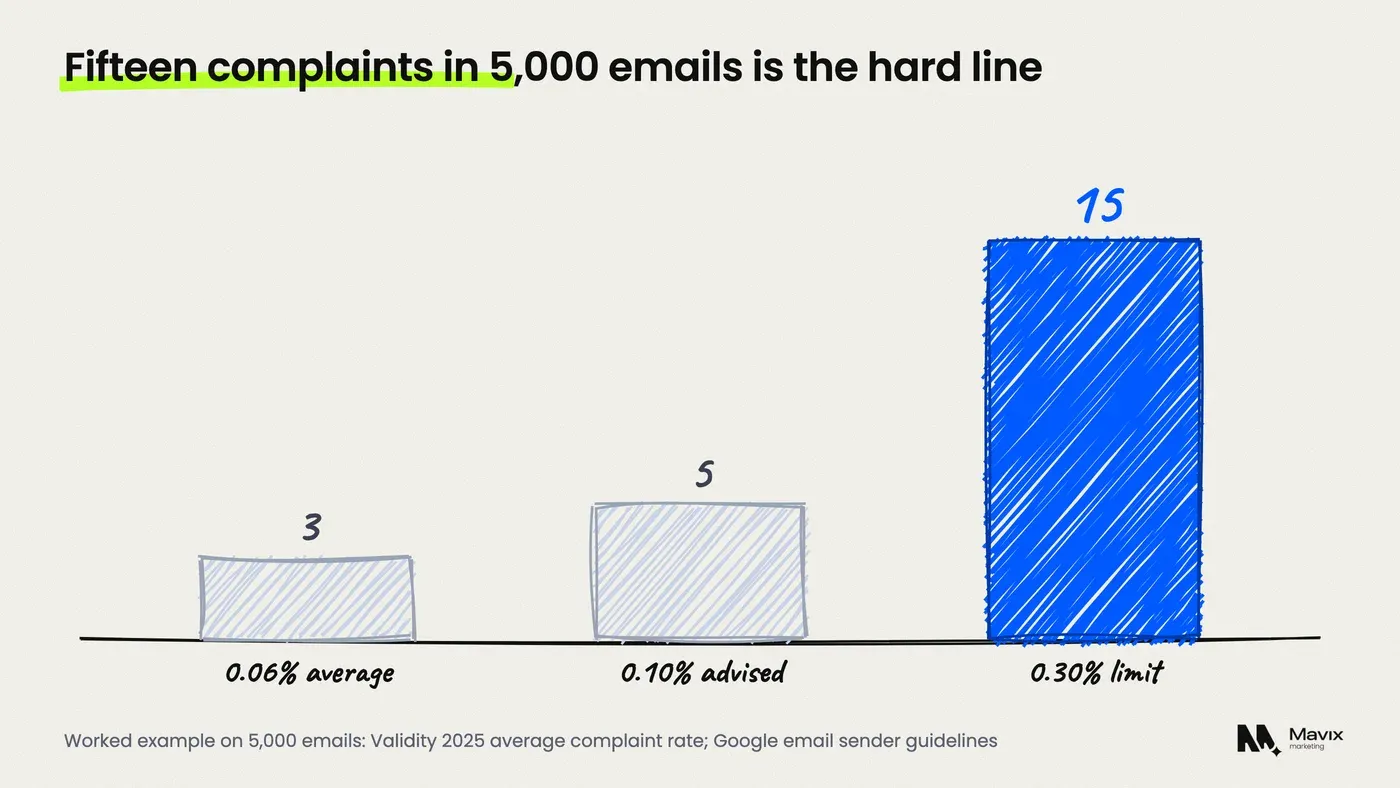
Fifteen complaints is one unhappy group of customers who forgot they signed up. Google Postmaster Tools is free and shows your Gmail spam rate, authentication results and domain reputation, once you send enough mail to Gmail addresses each day for it to measure. Yahoo’s Complaint Feedback Loop sends you a copy of each complaint.
Is your email list the problem?
An old, bought or scraped list is the most common reason a business that passes every technical check still lands in spam. Google tells senders not to buy addresses, to confirm new subscribers, and to remove people who never open.
Old addresses do damage in two ways. Dead ones bounce, and Google can delete a personal account after two years of inactivity (Google Account Help). Live ones belong to people who forgot you, and they press “report spam” instead of unsubscribe.
What to do with the list:
- Remove hard bounces after the first one, and repeated soft bounces.
- Stop mailing anyone who has not opened or clicked in about six months, after one last re-engagement email.
- Never import a bought or scraped list into the platform you use for customers.
- Use confirmed opt-in on new signups, so typos and fake addresses never reach the list.
A re-engagement email campaign is the polite way to find out who still wants to hear from you before you remove them.

Does the content of an email send it to spam?
Content matters less than reputation, but some patterns still hurt. Google’s guidelines warn against hiding content with HTML or CSS, mixing promotions into receipts, and links whose destination is unclear. A few words such as “free” do not send a trusted sender to spam on their own.
| Content habit | Why it hurts | Fix |
|---|---|---|
| One large image with no text | Filters cannot read it, and many readers see a blank | Keep real text in the body |
| Links on a shortener or someone else’s domain | The link domain carries its own reputation | Link to your own domain |
| A sales offer inside an invoice or receipt | Google says not to mix content types | Send promotions separately |
| Hidden text or tiny white type | Google names it directly | Remove it |
| No visible unsubscribe link | Readers report spam instead | Put it in the footer, one click |
The table shows that each fix is a template change, done once. US law also sets content rules. The FTC’s CAN-SPAM guide requires honest subject lines, a valid postal address and opt-outs honored within 10 business days. Penalties reach up to $53,088 per email (FTC).
Did your sending volume change?
A sudden jump in volume looks like a spammer to an inbox. Google tells senders to increase volume slowly, starting with the most engaged people, to send at a steady rate, and warns that doubling volume suddenly can cause rate limiting.
This is the cause when a business that emails a few hundred people a month sends its whole 8,000 contact list for one sale, or launches on a brand new domain. Warm up instead: send first to the people who opened recently, then widen the send over a few weeks. Pick a regular day and keep to it, so your volume stays predictable.
If you are setting up your first automated emails, our email flows checklist shows which ones to build first so sending stays steady. Triggered flows send a few emails every day instead of one big blast, which is why email automation tends to deliver better than occasional campaigns.
When fixing deliverability will not help
Deliverability fixes get email into the inbox; they do not make people want it. If the list is healthy and every record passes but nobody opens or buys, the problem is the offer, the timing or the audience. Google itself notes that it does not track opens, so a low open rate alone does not prove a spam problem.
It is also not worth deep work for a business sending a handful of emails a week from a normal mailbox. Set up SPF, DKIM and DMARC once, and move on. The returns from a well run list are covered in what email marketing earns a small business, and the monthly fees are on our email marketing pricing page. If you want the setup, list cleaning and flows handled, our email marketing service covers it.
Questions people ask about emails going to spam
Why are my emails going to spam in Outlook but not Gmail?
Microsoft filters harder than Gmail. Validity’s 2026 benchmark report put Microsoft’s 2025 inbox placement at 77.4 percent against 89.8 percent at Gmail, with 15.1 percent of tested mail landing in junk. Since May 2025 Microsoft has also required SPF, DKIM and DMARC from domains sending over 5,000 emails a day to Outlook.com, Hotmail and Live addresses (Microsoft). Check your authentication first, then look at complaints from Outlook recipients.
How do I stop my emails going to spam for free?
Most fixes cost nothing but time. Check the headers of one email in Gmail’s Show original view. Add SPF, DKIM and DMARC records for every service that sends as you. Set up Google Postmaster Tools, and remove bounced and inactive addresses. Add a visible unsubscribe link. Paid tools help large senders, but most small businesses never need them.
Why do my emails go to spam even after setting up DMARC?
DMARC proves who sent the email; it does not prove anyone wanted it. If authentication passes and mail still lands in spam, the cause is usually a high complaint rate, old or bought addresses on the list, or a sudden jump in volume. Check Google Postmaster Tools for your spam rate and domain reputation next.
How long does it take to fix email deliverability?
Fixing DNS records takes minutes, and the change usually applies within a day. Repairing a damaged reputation takes longer, because inboxes judge you on recent sends. Expect several weeks of steady sending to engaged contacts before placement recovers. Sending more to make up for lost reach makes it worse.
Do spam trigger words still matter?
Far less than they used to. Modern filters weigh sender reputation, authentication and how recipients react much more heavily than single words. A trusted sender can write “free” without trouble. Misleading subject lines still matter, though, because CAN-SPAM requires the subject to match the content and annoyed readers report spam.
Should I use a separate domain for marketing emails?
A subdomain such as news.yourdomain.com can keep a bad newsletter week from hurting invoices sent from your main address. Google counts mail from subdomains towards the same primary domain for its 5,000 a day bulk sender threshold (Gmail Help), so it is not a way around the rules. Use the same From address for each type of message.
The bottom line
Do not rewrite your emails first. Open one email’s headers, fix any FAIL in SPF, DKIM or DMARC, check your complaint rate, and clean the list. Most spam problems end there, and the rest are volume or content habits fixed once in the template.
If your emails keep landing in spam and you want it sorted, get your email setup checked for free. You get a written list of what is failing and the fix for each, usually within one working day.
Free review
Want this looked at on your own site?
Send the address. A person reads it and writes back with the two or three things that would move your enquiry number first. Free, and yours to keep whether you hire us or not.