
HVAC SEO: the service pages that bring in calls, from repair and install pages to city pages that Google keeps
Which pages an HVAC website needs to rank and get calls: repair and install pages, brand pages, city pages that are not doorways, schema and the Google profile.
The HVAC pages that bring in calls are one page per service people actually search for, with repair and installation kept on separate pages because the searcher wants different things. Add brand pages for equipment you service, city pages only where you have something local to show, HVACBusiness markup, and a Google Business Profile that points at them.
This page is for owners of heating and air conditioning companies whose website ranks for their name but not for “AC repair” or “furnace installation” in their area. It gives the page map, what each page needs, and the mistakes that get city pages ignored by Google.
The short version
- Give each service its own page: AC repair, AC installation, furnace repair, furnace installation, heat pumps, maintenance plans. One “Services” page cannot rank for all of them.
- Repair pages sell speed and the phone number; installation pages answer price, financing and efficiency questions.
- Google’s spam policies name pages “targeted at specific regions or cities that funnel users to one page” as doorway abuse, so a city page needs real local content.
- Google says local ranking depends on relevance, distance and prominence, and that you cannot pay for a better local ranking.
- A Google search ad lead cost a median $127.74 for air conditioning and $129.02 for heating in LocaliQ’s 2025 data, which is what each organic call from a page saves you.
What is HVAC SEO?
HVAC SEO is the work that makes a heating and cooling company show up in Google’s map results and organic results when people nearby search for a service. It has two halves: the website, where each service page earns rankings for its searches, and the Google Business Profile, which competes in the map. The pages below are the website half.
Most HVAC websites have a home page, an about page and one services page listing everything. That structure ranks for the company name and little else, because Google matches pages to searches, and “AC repair” and “furnace installation” are different searches with different searchers.
Which service pages does an HVAC website need?
An HVAC website needs one page for each service people search for separately, split into repair, installation and maintenance where the job differs. Google says a business ranks locally on relevance, distance and prominence, and relevance means how well a listing matches the search (Google Business Profile Help). A page that matches one search does that better than one that lists twenty.
| Page | Example search | What the page must answer | Main call to action |
|---|---|---|---|
| AC repair | ac repair near me | How fast you come, what a call-out costs, the common faults | Call now |
| AC installation | new ac unit cost | Price ranges, system sizes, financing, efficiency ratings | Book a free quote |
| Furnace repair | furnace not heating | Same day service, safety (gas smell, carbon monoxide) | Call now |
| Furnace installation | furnace replacement | Gas versus electric, price ranges, warranty | Book a free quote |
| Heat pumps | heat pump installation | How they compare with AC plus furnace, cold climate models | Book a free quote |
| Maintenance plan | hvac maintenance plan | What a visit includes, price per year, priority service | Join the plan |
| Emergency service | 24 hour ac repair | Hours, after hours fee, response time | Call now |
The table shows that the pages split into two kinds: urgent pages built around the phone, and planned pages built around a quote. Start with the services that earn the most and that you want more of, then add the rest. Our HVAC SEO page shows how we plan that page map for a heating and cooling company. Our HVAC marketing statistics collect the trade’s sourced numbers if you need them for the business case.
Why should repair and installation have separate pages?
Repair and installation need separate pages because the person searching wants something different. Someone typing “AC not cooling” wants a technician today and a phone number now. Someone typing “new AC unit cost” is comparing quotes over days or weeks. One page cannot serve both without failing one of them.
A repair page should be short at the top: the service, the area, the phone number, how fast you arrive and what a visit costs if you publish it. Under that, the common faults in plain words, so the page also matches searches like “AC blowing warm air”.
An installation page can be longer, because the reader is researching:
- Price ranges for common system sizes, and what changes the price.
- Financing terms, if you offer them.
- Efficiency ratings and what they mean for the bill.
- Rebates and tax credits, kept current. The IRS lists the Energy Efficient Home Improvement Credit, which allowed up to $2,000 a year for qualified heat pumps, as covering property placed in service only through 2025 (IRS). An install page still promising it in 2027 costs you trust.
Should an HVAC company make brand pages?
Yes, for the equipment brands you install or service regularly. People search “Trane furnace repair” or “Carrier AC installation” when they already own a unit or have a brand in mind. A brand page that says which models you work on, if you are an authorized dealer, and how warranty registration works can rank for searches your competitors ignore.
Three rules keep brand pages useful rather than thin:
- Only brands you really work on. A page for a brand your technicians never touch brings calls you have to turn away.
- Say what is true about your status. If you are not a dealer, say you service the brand. Check the manufacturer’s dealer rules before using its logo.
- Give each page something of its own, such as common faults on that brand’s units or the warranty steps, not the AC repair page with the brand name swapped in.
How do you build HVAC city pages that Google keeps?
Build a city page only for a town you serve often and can say something specific about. Google’s spam policies name “multiple domain names or pages targeted at specific regions or cities that funnel users to one page” as doorway abuse, and separately warn against generating many pages mainly to manipulate rankings (Google Search Central).
A city page that repeats the same text with a new town name fails that test. One that passes has content only that town could have:
- Jobs you have done there, with photos and the problem you fixed.
- Reviews from customers in that town.
- Local details that change the job: older housing stock, a utility rebate, permit rules, typical drive time.
- The services you offer there, linking to the main service pages.
If you can write that for five towns, build five pages, not fifty. Our guide to service area pages goes through the structure in more detail.
What schema markup should an HVAC website use?
Use LocalBusiness structured data with the HVACBusiness type. Schema.org defines HVACBusiness as “a business that provides Heating, Ventilation and Air Conditioning services” (Schema.org), and Google advises using the most specific LocalBusiness subtype possible (Google Search Central).
Google lists the business name and address as required properties, and recommends opening hours, phone number, URL and coordinates. Put the markup on the home page or contact page, with the same name, address and phone number as your Google Business Profile.
Do not add review star markup for your own business. Google’s guidelines limit review and rating markup on LocalBusiness to sites that collect reviews about other businesses, so stars you award yourself will not show in results. More on the code is in our post on schema markup for local businesses.
How does the Google Business Profile tie into service pages?
The Google Business Profile is the listing that competes in the map results, and your service pages give it the relevance it needs. Google ranks local results on relevance, distance and prominence, and says reviews and complete information help, while there is no way to pay for a better local ranking.
Four links between the two:
- Match the services list on the profile to your service pages, using the same names.
- Choose categories to match the pages, starting with the main one. See Google Business Profile categories.
- Keep the business name clean. Google’s guidelines bar service descriptions and locations from the name, and say extra information can lead to suspension (Google Business Profile Help).
- Hide your address if customers do not visit you. The same guidelines tell service-area businesses to hide the address and set a service area.
The map side of the work, including reviews and photos, is on our HVAC local SEO page.
What should an HVAC service page include?
An HVAC service page that brings calls answers the searcher’s question in the first screen and makes calling easy on a phone. Many visitors arrive on a phone, often with the system already broken.
- A heading that names the service and the area, such as “AC repair in Round Rock”.
- The phone number at the top, tappable on mobile, with the hours it is answered.
- One short paragraph on how fast you come and what happens on the visit.
- Proof: review count and rating from your profile, licence number where your state issues one, years trading.
- The faults or options, in plain words, as headings people search.
- Price guidance where you can give it honestly.
- Three to five questions customers actually ask on the phone.
- A short form for people who will not call.
Write in the words customers use on the phone. “My AC is running but not cooling” is a search; “comprehensive cooling solutions” is not.
What is a ranking service page worth?
A ranking page is worth the calls it brings, priced at what the same call would cost from ads. In LocaliQ’s 2025 home services benchmarks, the median Google search ad lead cost $127.74 for air conditioning and $129.02 for heating and furnaces, against $90.92 for home services overall (LocaliQ).
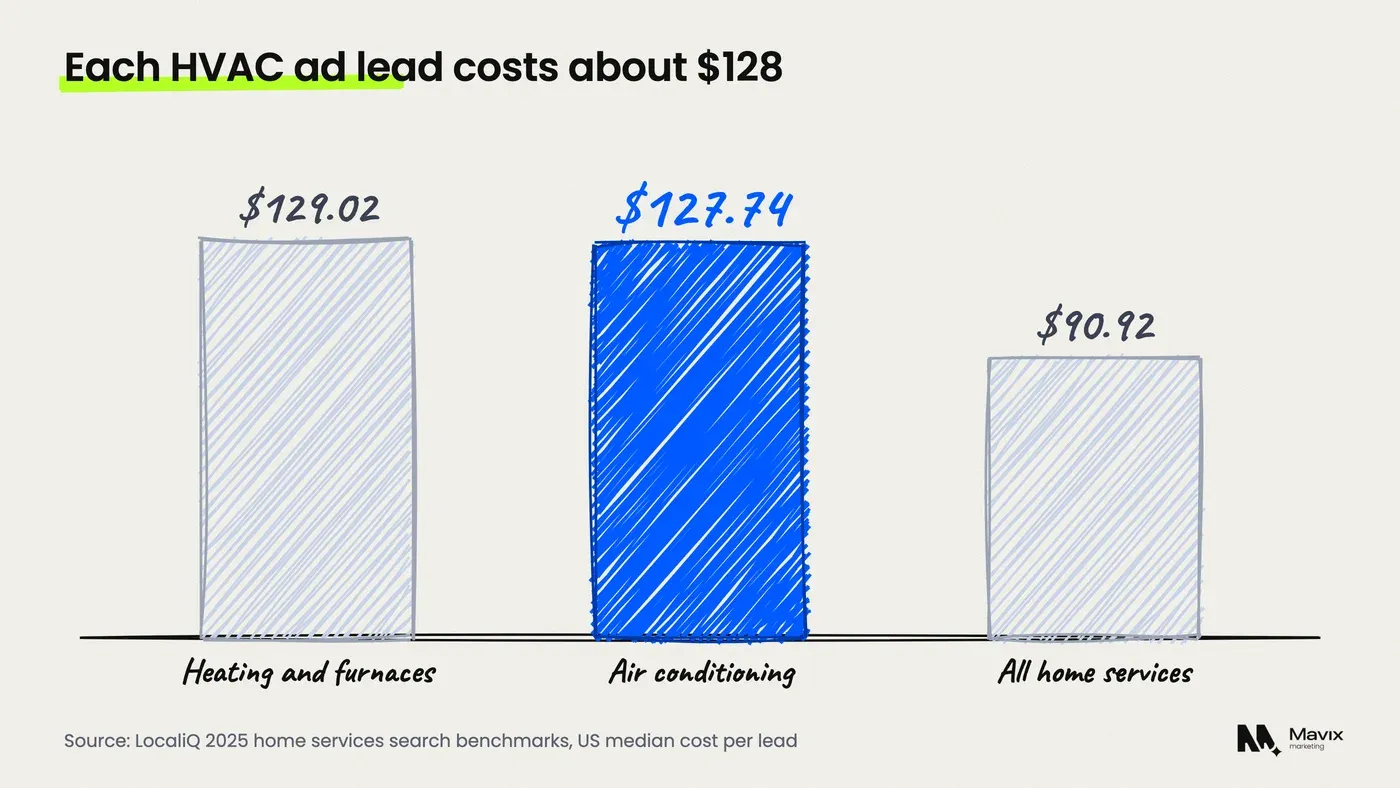
A worked example. If an AC repair page brings 10 calls a month from organic search, those calls would cost about $1,277 a month as ad leads at the $127.74 median. Over a year that is about $15,330 of ad leads from one page. The page keeps working in the months you do not pay for it, which is why most HVAC companies run both: ads for peak weeks, pages for the base.
When you do run ads, our guide to the HVAC Google Ads budget by season shows how to move money between summer and winter.
When service pages will not fix HVAC rankings
Service pages are not enough when the Google Business Profile has few reviews, when the site is too slow or broken on mobile, or when the company is new and needs calls this month. Pages take months to rank, and a strong page on a weak site still loses to a competitor with 400 reviews and a ten-year-old domain.
Fix the order: profile and reviews first, then the main repair and install pages, then brands and towns. If the site does not rank at all, start with why a website is not ranking on Google. If you need calls during peak season, Google Ads for HVAC fills the gap while pages build.
Questions people ask about HVAC SEO
How many service pages should an HVAC website have?
Most HVAC companies need between six and fifteen service pages: repair and installation for each main system, maintenance, emergency service, and a few for indoor air quality or ductwork if you sell them. Start with the services that bring the most profit, and add a page only when you can answer that search better than the page that ranks now.
Do HVAC companies need a page for every city?
No. Build city pages only for towns you serve often and can describe with real local content, such as jobs, reviews and local rules. Google’s spam policies treat near-identical city pages that funnel visitors to one page as doorway abuse. Five strong town pages usually do better than fifty thin ones.
How long does HVAC SEO take to bring calls?
Expect a few months for new service pages to rank in a competitive town, and longer for a brand new website. Map results can move sooner once the Google Business Profile is complete and reviews are coming in steadily. Our guide on how long SEO takes sets out the usual timeline.
Should HVAC companies blog?
Only after the service pages exist. A blog post on “why is my furnace blowing cold air” can rank and bring calls if it answers the question and links to the furnace repair page. Posts that do not lead to a service page, such as general company news, rarely bring a call.
What is the most important HVAC SEO ranking factor?
Google names relevance, distance and prominence for local results. You cannot change distance, so the work is relevance, meaning pages and a profile that match the search, and prominence, meaning reviews, ratings and how well known the business is across the web. Reviews are usually the quickest of those to improve.
Is HVAC SEO better than Google Ads?
They do different jobs. Google Ads brings calls this week and stops when the budget stops; SEO takes months and keeps bringing calls without a cost per click. At a median $127.74 per air conditioning ad lead in LocaliQ’s 2025 data, a page that ranks pays for itself quickly. Most HVAC companies need both through the first year.
The bottom line
Do not build fifty pages. Build the six to ten service pages your best jobs come from, split repair from installation, add brand and town pages only where you have something real to say, and match your Google Business Profile to them. Then add pages one at a time as each earns its place.
If you want to know which pages your site is missing, get a free HVAC SEO page plan. You get a list of the service, brand and town pages to build, in order, usually within one working day.
Free review
Want this looked at on your own site?
Send the address. A person reads it and writes back with the two or three things that would move your enquiry number first. Free, and yours to keep whether you hire us or not.