
Service area pages that rank: what each city page needs so Google does not treat it as a doorway page
City pages that only swap the town name are what Google calls doorway abuse. What each service area page needs instead, how many to build, and a test for each.

A service area page ranks when it carries something true about that town that no other page on your site carries: jobs done there, local conditions, local rules, local reviews. A page that differs from the next only by the city name is what Google’s spam policies call doorway abuse, and a set of them can pull down the whole site.
This page is for owners of service businesses that travel to the customer, such as plumbers, roofers, HVAC firms, cleaners and pest control, who want to rank in the towns around them. It covers what Google says, what each page needs, how many pages to build, and a five-minute test to run on any city page before it goes live.
The short version
- Google’s spam policies list “pages targeted at specific regions or cities that funnel users to one page” as an example of doorway abuse.
- In Whitespark’s 2026 Local Search Ranking Factors survey of local search experts, a dedicated page for each service ranked first of all local organic factors, and city keyword relevance second.
- Build city pages only for the towns that already send you jobs, and only when you can fill them with facts specific to that town.
- Service pages come before city pages: one strong page per service beats twenty thin city pages.
- Google lets a service area business list up to 20 service areas in its Business Profile, within about two hours’ drive of its base.
What is a service area page?
A service area page is a page on your website about the work you do in one town or district, written for people searching there, such as “roof repair Frisco” or “AC repair Katy”. It is different from a location page, which is for a physical office or shop with its own address. Most trades that drive to the customer need service area pages, not location pages.
Service area pages matter because Google ranks two separate things for a local search. The map results draw mostly on your Google Business Profile. The ordinary results under the map draw on your website, and that is where a page about a town can rank in a town where you have no office.
What does Google count as a doorway page?
Google counts a page as a doorway when it exists to rank for a search and then passes the visitor somewhere else, without being useful itself. Its spam policies define doorway abuse as “when sites or pages are created to rank for specific, similar search queries”. They give four examples, and one of them describes the typical city page set exactly (Google Search Central).
The four examples from Google’s spam policies:
- Multiple websites with slight variations to the URL and home page.
- Multiple domain names or pages targeted at specific regions or cities that funnel users to one page.
- Pages generated to funnel visitors into the usable part of a site.
- Substantially similar pages that are closer to search results than a clearly defined, browseable hierarchy.
The same policies describe scaled content abuse: many pages generated “for the primary purpose of manipulating search rankings and not helping users”, no matter how they were made. Fifty city pages written by swapping the town name in a template fit both descriptions. Google says sites that break its policies “may rank lower in results or not appear in results at all”.
Do service area pages still help local SEO?
Yes, when each one is a real page about real work. In Whitespark’s 2026 Local Search Ranking Factors survey, published November 2025, the invited local search experts ranked “Dedicated Page for Each Service” first of all local organic factors. They ranked “Geographic (City/Neighborhood) Keyword Relevance of Content” second (Whitespark). These are expert scores, not Google’s own figures.
| Factor in Whitespark’s 2026 survey | Rank for local organic results | Score |
|---|---|---|
| Dedicated page for each service | 1 | 210 |
| City or neighborhood keyword relevance of content | 2 | 190 |
| Keywords in title tags across the site | 11 | 167 |
| Volume of quality content on service pages | 17 | 154 |
| Setting service areas in your Business Profile | 161 | 25 |
The table shows two things. Service pages come first and city relevance second, so the order of work is clear. And the service area setting in your Business Profile does almost nothing for the ordinary results on its own. The website pages do that work.
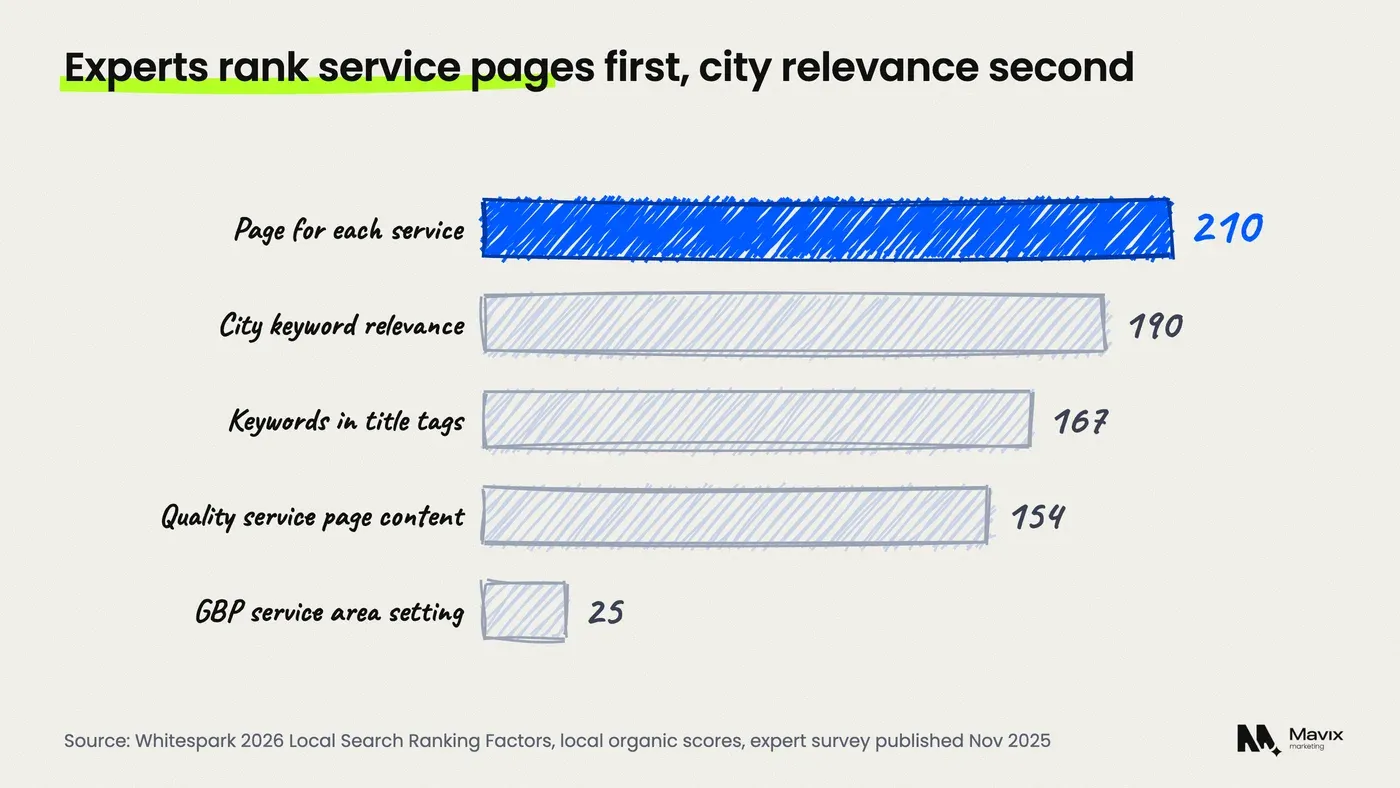
Whitespark also notes that massive pages of content are no longer the way to rank. A 400-word city page with three real local facts beats a 2,000-word page padded with the town’s history.
What unique content does each city page need?
Each city page needs at least three things that are true only of that town and that a customer there would care about. A town’s population and founding date do not count, because they say nothing about your work. Jobs, reviews, local conditions and local rules do.
| What to add | Where it comes from | Why it counts |
|---|---|---|
| Two or three jobs done in that town, with photos | Your job records and phone camera | Proves you work there, and nobody else has it |
| Reviews from customers in that town | Your Google reviews, filtered by area | Local proof, in the customer’s own words |
| Local conditions that change the job | Your crews: soil, water hardness, older housing, storms | Shows knowledge a template cannot fake |
| Local rules: permits, HOA or inspection steps | The city’s own website, linked | Answers a real question before the call |
| Response time and who covers it | Your dispatch data | The question most callers ask first |
| Prices or ranges if they differ by area | Your quotes | Rare on competitors’ pages, and useful |
The table shows that most of the material sits in your own records, not in research. That is why owners can write better city pages than an agency template: the crew who has been in that town’s crawl spaces knows what goes wrong there. Never invent a job, a review or a local fact to fill a page. If you cannot fill three rows for a town, that town does not get a page yet.
How many service area pages should you build?
Build one page for each town that already sends you a steady share of jobs, and no more until those pages earn traffic. For most small service businesses that means three to eight pages, not fifty. Count your jobs from the last 12 months by town or zip code, rank the towns, and start from the top.
The steps:
- Export your jobs. Pull the last 12 months of booked jobs with the customer’s town or zip code.
- Rank the towns. Sort by number of jobs, and by revenue if the job sizes differ.
- Draw the line. Towns with enough past jobs to show photos and reviews get a page. The rest are listed on one “areas we serve” page.
- Write the first three. Publish the top three, link to them from the matching service pages, and give them time.
- Add more only when the first ones work. If the first pages bring calls from those towns, the next town on the list gets a page.
Here is an example with round numbers. A roofer with 240 jobs last year finds 70 in its home city, 45 in the next suburb, and 30 and 25 in two more. The remaining 70 are spread across fourteen towns at five jobs each. Four towns hold 170 jobs, about 71 percent of the work. Those four get pages. The other fourteen get a line on the areas page. Roofers can see the same order of work, service pages and then towns, on our page about local SEO for roofing companies.
How should service area pages fit with your service pages?
Service pages come first, and city pages sit beside them as the local version. A plumber should have one page for water heater repair, one for drain cleaning, one for emergency work, and then a page for each main town that links to those service pages. Whitespark’s experts put a dedicated page per service at the top of the local organic factors, above city relevance.
How to link them:
- The home page links to each service page and to the areas page.
- Each service page names the main towns and links to their pages.
- Each city page links back to the services offered there, and to one or two neighboring towns’ pages.
- Nothing is reachable only from the footer.
Our planned guide to internal linking for small business websites covers the anchor text. For a worked example of service pages in one trade, see HVAC service pages that rank.
A business with several offices needs location pages for each office as well, which is a different job covered in SEO for multiple locations.
What should your Google Business Profile say about service areas?
Your Business Profile should list the towns you really serve, within about two hours’ drive, and hide your address if customers do not visit you. Google’s help page says you can have up to 20 service areas. It also says “the boundaries of your overall area shouldn’t be more than about 2 hours of driving time from where your business is based” (Google Business Profile Help).
Keep the profile and the website telling the same story. If the profile lists twelve towns, the areas page on your site lists the same twelve, and the city pages cover the biggest of them. If your listing is missing from the map altogether, start with why a Google Business Profile does not show before building pages.
How do you test a city page before it goes live?
Run this test on every city page before publishing, and on any that already exist. It takes about five minutes a page.
- The swap test. Replace the town name with a neighboring town. If the page still reads as true, it is a doorway page. Rewrite it.
- The three-facts test. Point to three things on the page that are true only of this town. Fewer than three, the page waits.
- The proof test. Is there at least one job photo or review from this town?
- The dead-end test. Can the visitor call, book or ask for a quote from this page, without being sent somewhere else first? A page that only funnels to the home page matches Google’s doorway description.
- The person test. Would a homeowner in that town learn something useful? Google’s guidance on helpful content asks whether you are “producing lots of content on many different topics in hopes that some of it might perform well in search results” (Google Search Central).
If you already have dozens of thin city pages, keep the few that pass, merge the rest into the areas page, and redirect each removed URL to it. Our local SEO checklist lists the other checks to run at the same time, and local SEO services covers what a full local setup includes.
Questions people ask about service area pages
Are city landing pages bad for SEO?
No. City landing pages are only a problem when they are near copies of each other built to rank and funnel. Google’s spam policies name pages targeted at regions or cities that funnel users to one page as doorway abuse. A city page with real jobs, reviews and local detail from that town is a useful page, and those can rank well in the ordinary results under the map.
Can I rank in a city where I have no office?
Yes, in the ordinary results, with a good page about your work in that city. The map results are harder, because Google names distance, meaning how far the business is from the person searching, as one of its three main local ranking factors (Google Business Profile Help). A service area business can list the town in its Business Profile service areas, but the website page is what usually wins the ordinary results there.
How long should a service area page be?
As long as the real local content makes it, which is often 400 to 800 words. Length does not make a page rank. Whitespark’s 2026 report notes that massive pages of content are no longer the way. Three local facts, two job photos, a review and a clear way to call do more than a long page padded with the town’s history.
Should I use AI to write my city pages?
Only to tidy what you supply, never to invent it. Google’s spam policies list using generative AI tools to generate many pages without adding value for users as scaled content abuse. AI can turn your crew’s notes about a town into clean sentences. It cannot know which streets flood or which jobs you did there, and an invented local fact is worse than none.
What happened to sites with lots of thin pages?
Google said its March 2024 core update and spam policy changes led to 45 percent less low-quality, unoriginal content in search results, against the 40 percent it had expected (Google). Sites built on large sets of templated pages were the target. Sites that break the policies can rank lower or drop out of results entirely.
Do I need a separate page for every service in every city?
No. That is how sites end up with hundreds of thin pages. Build one page per service, then one page per main town that links to those services. A dedicated service-and-city page, such as drain cleaning in one suburb, earns its place only when you have enough real jobs and reviews for that service in that town to fill it.
The bottom line
Do not build a page for every town on the map. Count where your jobs came from last year. Write pages for the top three to eight towns using your own job photos, reviews and local knowledge, and run the swap test on each before it goes live. Strong service pages first, then the towns.
If you have city pages already and are not sure which ones Google would call doorways, get your local pages checked for free. You get a written list of the pages to keep, merge or rewrite, and what each kept page is missing.
Free review
Want this looked at on your own site?
Send the address. A person reads it and writes back with the two or three things that would move your enquiry number first. Free, and yours to keep whether you hire us or not.