Website traffic but no leads? The seven places visitors leak, and a 30-minute check to find yours
Visitors arriving but nobody calling or filling in the form? The seven usual leaks, from the wrong traffic to slow mobile pages, and a 30-minute check.
When a website gets traffic but no leads, the usual cause is the traffic itself: visitors who were never going to buy, from the wrong searches or the wrong places. Check that first, then whether leads are being counted at all, then the page: the offer, the form, the proof, speed and the mobile layout. Most leaks show up in a 30-minute check.
This page is for owners of service businesses and small stores whose analytics show visits rising while calls and forms stay flat. It covers the seven leaks in the order to check them, what a normal lead rate looks like. It also gives a half-hour check you can run today in Search Console, Google Analytics and on your own phone.
The short version
- Check the traffic before the page: blog visits from people outside your area or looking for DIY help will never become leads.
- Check the tracking second. Calls from a mobile tap-to-call button and form emails often go uncounted, so “no leads” can be “no lead tracking”.
- Unbounce’s 2024 benchmark puts the median landing page conversion rate at 6.6 percent across more than 41,000 pages.
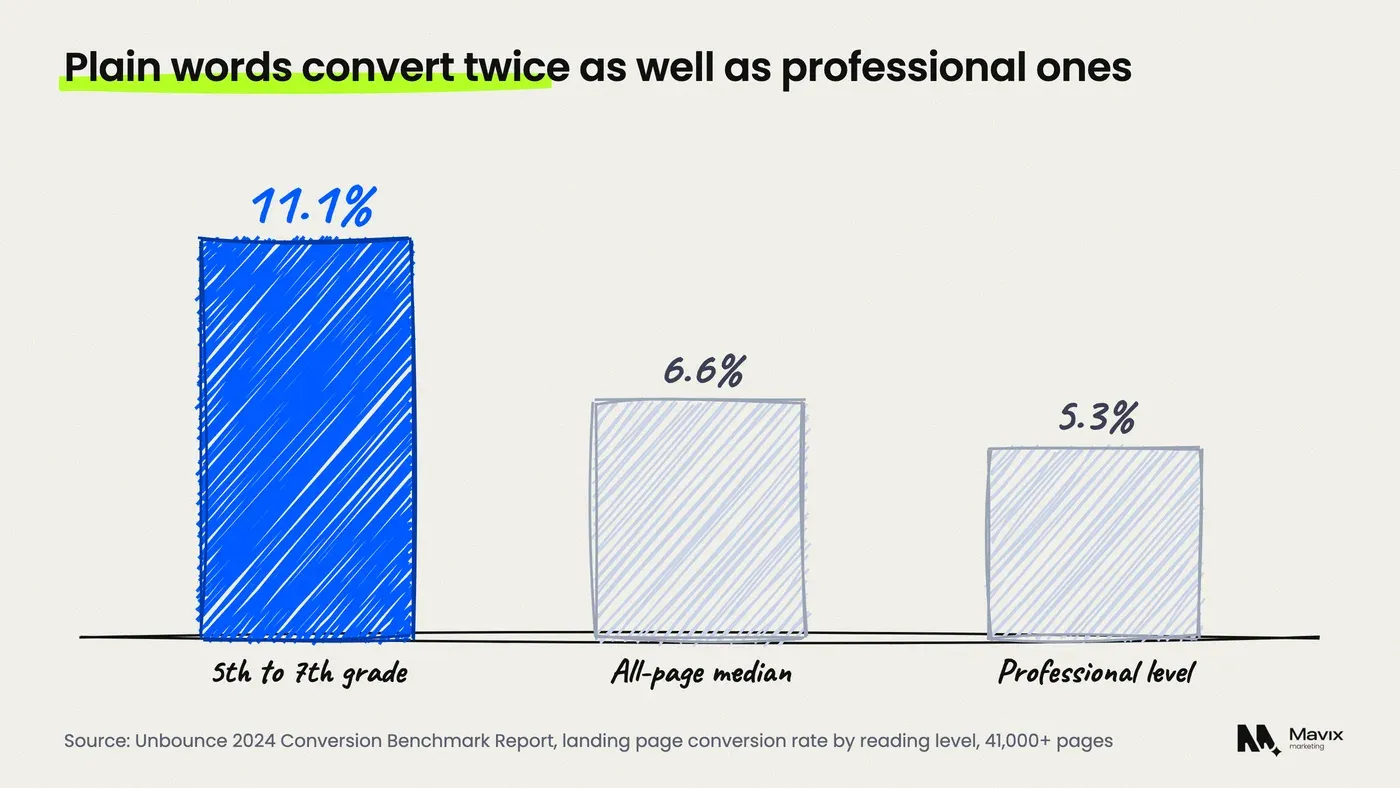
- In the same data, pages written at a 5th to 7th grade reading level converted at 11.1 percent, against 5.3 percent for professional-level writing.
- In a Google-commissioned Deloitte study, a 0.1 second faster mobile site came with a 21.6 percent rise in lead generation visitors reaching the form page.
Why does my website get traffic but no leads?
Most sites with traffic and no leads are getting the wrong visitors, are not counting the leads they get, or are making the next step hard. Those three causes cover nearly every case, and they need checking in that order, because a better page cannot turn a DIY searcher in another state into a customer.
The seven leaks, in the order to check them:
| Leak | What it looks like | Where to check |
|---|---|---|
| 1. Wrong traffic | Visits go to blog posts, from far away or from DIY searches | Search Console queries, Analytics location |
| 2. Broken tracking | Calls and emails arrive but Analytics shows zero | Analytics key events, your inbox |
| 3. No clear offer | The page describes you but never says what to do next | Read the page top to bottom on a phone |
| 4. A hard form | Long forms, required fields, a broken submit | Fill your own form on a phone |
| 5. No proof | No reviews, photos, prices or license near the ask | The service pages, above the form |
| 6. A slow page | The page takes seconds to show on mobile data | PageSpeed Insights |
| 7. A broken mobile layout | Tiny buttons, a phone number that does not tap | Your own phone, not the desktop preview |
The table shows that the first two leaks sit outside the page. They are also the two most often skipped, because they are not visible when you look at your own website.
Is the traffic coming from people who could become customers?
Often it is not. A site can double its visits with blog posts that rank for questions asked by people across the country, people who want to fix the problem themselves, or other businesses. Google Search Console’s Performance report shows the searches, pages, countries and devices behind your visits (Search Console Help), which is where to find out.
What to look for:
- Which pages get the visits. If most go to blog posts and few to service pages, the traffic is reading, not shopping.
- Which searches bring them. “How to fix a running toilet” is a DIY searcher. “Plumber near me” is a customer.
- Where they are. A local business with half its visits from other states has traffic it cannot serve.
A worked example with round numbers. A site gets 3,000 visits a month: 2,400 to general blog posts and 600 to service pages. If the service pages convert at the 6.6 percent median and the blog posts produce almost nothing, that is about 40 leads, and the site-wide lead rate looks like 1.3 percent. The service pages are fine. The traffic report made the site look broken.
Are you counting the leads you already get?
A site that “gets no leads” is sometimes getting them and not counting them. In Google Analytics, a lead only appears if the action is set up as an event and marked as a key event. Google describes a key event as a way to “measure actions that are important to your business” (Google Analytics Help). Calls from a tap-to-call link and form emails are often missing.
Check three things against your own records for the last 30 days:
- Form emails. Count the enquiry emails in your inbox. Compare with the form key events in Analytics.
- Calls. Count calls from new numbers in your phone log. Tap-to-call clicks only show in Analytics if a click event is set up.
- Spam. If the form is filled mostly by bots, real leads are hidden in the noise, and the count looks healthy when it is not.
If the counts do not match, fix the tracking before changing the website. Our tracking setup checklist lists the events to set up. If the traffic comes from paid ads, why Google Ads clicks bring no leads covers the ad side.
What is a normal lead rate for a website?
A normal lead rate for a page built to get enquiries is a few percent to around ten percent. Unbounce’s 2024 Conversion Benchmark Report, built on more than 41,000 landing pages and 57 million conversions, puts the median at 6.6 percent across all industries (Unbounce). A site-wide rate is lower, because blog and about pages are not built to convert.
So compare like with like. Your service pages and landing pages should be judged against the landing page median. Your whole site should not. Our guide to what a good conversion rate is breaks the benchmarks down by page type.
The same report found something any owner can act on. Pages written at a 5th to 7th grade reading level converted at 11.1 percent, more than twice the 5.3 percent for professional-level writing. Unbounce also found that word count and reading time were negatively correlated with conversion rate.
Does the page make a clear offer?
Many service pages describe the business and never say what the visitor gets for getting in touch. A clear offer names the next step, what it costs, and how fast it happens. An example is “Free roof inspection, booked this week, written report the same day”. Without one, the visitor leaves to compare, and may not come back.
Check each service page for three things in the first screen on a phone:
- What you do and where. “Water heater repair in Round Rock”, not “Quality plumbing solutions”.
- The next step and its price. A free estimate, a callout fee, a booking slot.
- One way to take it. A tap-to-call button or a short form, repeated further down the page.
Simple words help here. In Unbounce’s data, words of three syllables or more had the strongest negative link with conversion of any copy factor it measured. Write the offer the way you would say it on the phone.
Do visitors trust the page enough to call?
Visitors who arrive from reviews come to the website to check you. BrightLocal’s 2026 survey of 1,002 US consumers found that 97 percent read reviews for local businesses, and 54 percent check the business’s website after reading positive reviews (BrightLocal). If the site then shows no reviews, no photos of real work and no license number, the check fails.

Put proof next to the ask, not on a separate page: two or three recent reviews with names and towns, photos of real jobs, your license or insurance, and how long you have traded. Recency matters too. The same BrightLocal survey found 74 percent of consumers look for reviews written in the last three months. Our post on how to get more Google reviews covers keeping them fresh.
Is the site too slow or broken on mobile?
Speed and the mobile layout decide whether the page is seen at all. A study commissioned by Google and run by Deloitte covered 37 brand sites and more than 30 million sessions. In it, a 0.1 second faster mobile site came with a 21.6 percent rise in lead generation visitors progressing to the form submission page (web.dev). The study observed big brand sites, not small local ones, so treat it as direction, not a forecast.
Mobile is most of the traffic. Unbounce found 83 percent of landing page visits came from mobile, while desktop still converted 8 percent better on average. That gap is usually the layout:
- The phone number is text, not a link, so it cannot be tapped.
- Buttons are too small or too close together to hit with a thumb.
- A pop-up covers the form on a small screen.
- The form’s date or select fields are hard to use on a touch screen.
Run the page through PageSpeed Insights and check its Core Web Vitals against the limits in our post on Core Web Vitals thresholds. For the form itself, see contact form best practices.
How do you check where visitors leak in 30 minutes?
Run these six checks in order with Search Console, Google Analytics, your inbox and your own phone. Stop at the first one that fails, because fixing it often moves the rest.
- Minutes 0 to 5: the traffic. In Search Console, open Performance, then Pages. Note the share of clicks going to service pages against blog posts. Then open Queries and mark the ones a buyer would type.
- Minutes 5 to 10: the location. In Analytics, check the visitors’ cities. Note the share from the area you serve.
- Minutes 10 to 15: the count. Compare last month’s form key events and tap-to-call clicks with the enquiry emails and new-number calls you actually received.
- Minutes 15 to 20: the offer. Open your top service page on your phone. Can you say what you would get and how to get it from the first screen alone?
- Minutes 20 to 25: the form and the call. Fill in your own form and tap your own phone number. Did the email arrive? Did the phone ring?
- Minutes 25 to 30: speed and proof. Run the page through PageSpeed Insights, and count the reviews and job photos visible near the form.
Write down each failure as you go. That list, in order, is the fix plan. For a longer version with 30 specific checks, use the conversion audit checklist, and the website audit tool runs the technical side.
When is the website not the problem?
Sometimes the page is fine and the leak is after the lead. If forms arrive but nobody replies for a day, or calls ring out during working hours, the leads exist and are lost later. The fix then is the response, covered in speed to lead.
The website is also not the answer when the traffic is simply too small. A service page with 50 visits a month at the 6.6 percent median produces about three leads, and one quiet month says little. The job then is more of the right traffic, from search or ads, before rebuilding the page. If the page and the traffic both need work, conversion rate optimization covers how the two are fixed together.
Questions people ask about websites with traffic but no leads
How much traffic should a small business website need to get leads?
There is no fixed number, because it depends on who the visitors are. At Unbounce’s 6.6 percent landing page median, 100 visits a month to a service page would produce about six or seven enquiries. The same 100 visits to a general blog post may produce none. Count the visits to service pages from your own area, not total visits.
Can SEO bring traffic that never converts?
Yes. SEO can rank pages for informational searches, such as how-to questions, that attract people who want to learn, not hire. Those visits can still help a site’s reach, but they rarely become leads directly. Check in Search Console which searches bring the traffic, and make sure service pages rank for the searches a buyer would type.
Why does my contact form get only spam?
Usually because the form has no bot protection and the real visitors are leaving before they reach it. Add a spam filter such as a hidden field or a challenge that runs only on submit, then check whether real enquiries appear. If they still do not, the leak is earlier on the page: the offer, the proof or the mobile layout.
Should I add a chat widget to get more leads?
Only after the basics work. A chat widget adds another way to get in touch, but it also adds script weight that slows the page, and someone has to answer it within minutes. A tap-to-call button and a short form that both work on a phone usually do more for a small service business than an unanswered chat box.
How long does it take to fix a website that gets no leads?
Tracking and the mobile call button can often be fixed in a day. A clearer offer and proof on the main service pages takes a week or two of writing and photos. Changing what traffic the site attracts takes longest, because new or reworked service pages need time to rank, often months rather than weeks.
Is a low conversion rate always the website’s fault?
No. A low rate can come from the wrong traffic, broken tracking or slow replies to the leads that do arrive. Check those before rebuilding pages. A website rebuild that does not fix the traffic or the tracking usually produces a nicer site with the same flat lead count.
The bottom line
Do not redesign the website first. Spend 30 minutes finding out who the visitors are and whether their calls and forms are being counted. If the traffic is wrong, fix what ranks. If the counting is wrong, fix the tracking. Only when both are right is the page itself worth rebuilding, starting with the offer and the mobile call button.
If you would rather have someone else find the leak, get your website checked for free. You get a written list of where visitors drop off and what to fix first, usually within one working day.
Free review
Want this looked at on your own site?
Send the address. A person reads it and writes back with the two or three things that would move your enquiry number first. Free, and yours to keep whether you hire us or not.