Meta Conversions API for small businesses: who needs it, the cheapest way to set it up, and what it really fixes
The Meta Conversions API sends sales and leads from your server, not the browser. Who needs it, the five setup routes, what each costs, and the checks after.
Yes, if you run Meta ads that optimise for sales or website leads. The Conversions API sends those events from your server, so Meta still sees them when the browser pixel is blocked. Meta says advertisers using it for web events saw an average 17.8 percent lower cost per result. For most small businesses the setup costs between nothing and about $20 a month.
This page is for owners of small online stores and local service businesses who spend money on Facebook and Instagram ads. It helps you decide whether the Conversions API is worth doing and which setup route fits. It also shows how to check it is working once it is on.
The short version
- The Conversions API sends conversion events from your server to Meta, alongside the browser pixel. Meta recommends running both together.
- Meta reported on 15 April 2026 that advertisers with a Conversions API setup for web events saw an average 17.8 percent lower cost per result than those without one.
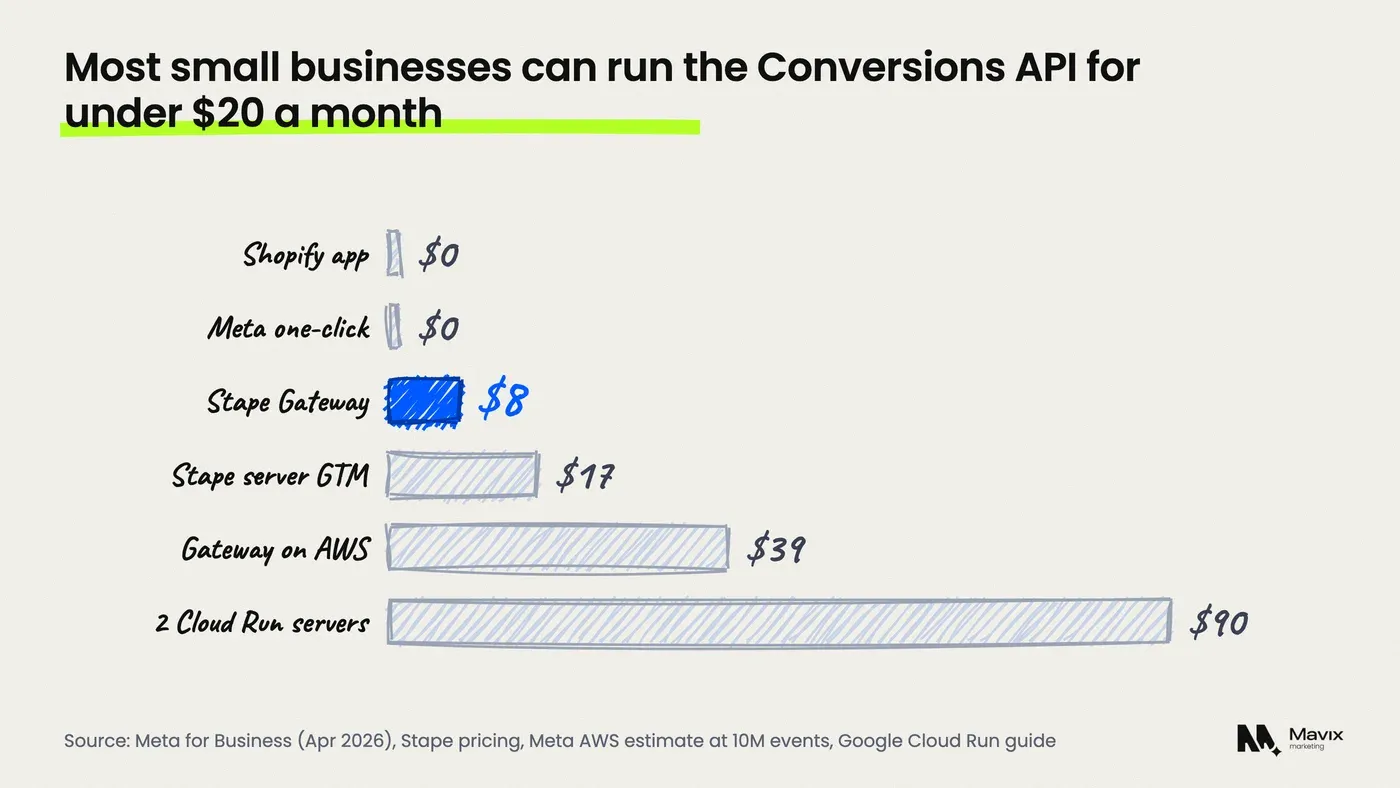
- Setup can cost $0 (Shopify, Meta’s one-click setup), about $8 a month (hosted Gateway), $17 a month (hosted server-side tagging) or about $90 a month (two Google Cloud Run servers).
- When the pixel and the API send the same event, Meta drops the duplicate if the event name and event ID match and both arrive within 48 hours.
- Lead ads that use Meta’s own forms need the separate CRM integration, which Meta says needs at least 200 leads a month.
What is the Meta Conversions API?
The Meta Conversions API is a direct connection between your website server, shop platform or CRM and Meta’s ad system. It sends the same events the pixel sends, such as a purchase or a form lead, but from a server instead of the visitor’s browser. Meta built it to feed its ad delivery and measurement with events the browser loses.
The pixel is a piece of code that runs in the browser. Ad blockers can stop it, and Safari limits how long it can remember a visitor: WebKit caps cookies set by page scripts to a seven-day expiry (WebKit). The Conversions API does not depend on the browser finishing the job, so it fills some of those gaps. It does not replace the pixel. Meta’s own guidance is to send the same events through both.
Does a small business need the Conversions API?
A small business needs the Conversions API when its Meta campaigns optimise for a website event, such as purchases, booked calls or form leads. Meta learns who to show ads to from those events, so missing events mean weaker targeting. If you only boost posts or buy traffic and reach, there is nothing for it to fix yet.
| Your situation | Need it? | Usual route |
|---|---|---|
| Shopify store running sales campaigns | Yes | Shopify’s Facebook and Instagram app, set to Enhanced or Maximum |
| Website leads (forms, bookings) from Meta ads | Yes | Meta’s one-click setup, or a hosted Gateway |
| Instant Form lead ads, 200+ leads a month | Yes, the CRM version | CRM integration through a partner or Zapier |
| Instant Form lead ads, under 200 leads a month | Not yet | Track lead quality in your CRM by hand |
| Boosted posts, reach or traffic only | No | Fix the goal first |
The table shows the deciding question is what the campaign optimises for, not the size of the business. A shop spending $500 a month on sales campaigns benefits as much as one spending $50,000, because both depend on Meta seeing the sale. If you are not sure which goal your campaigns use, our post on Meta lead ads versus a landing page explains the difference.
How much does the Conversions API cost to set up?
The Conversions API itself is free to use, and Meta says its one-click web setup has “no costs, no ongoing maintenance” (Meta for Business). The cost is in the route you pick: free on some shop platforms, around $8 a month for hosted Gateway, and more for a server-side tagging setup you run yourself.
| Setup route | Monthly cost | Who it suits |
|---|---|---|
| Shopify Facebook and Instagram app | $0 | Shopify stores |
| Meta one-click setup in Events Manager | $0 | Sites with a pixel already, low event coverage |
| Conversions API Gateway hosted by Stape | $8 per pixel, billed yearly | Any website, no developer |
| Conversions API Gateway on your own AWS | About $39 at 10M events | Businesses with an AWS account |
| Server-side Google Tag Manager on Stape Pro | $17, billed yearly | Sites already using Tag Manager |
| Server-side Google Tag Manager on Google Cloud Run | About $90 (2 servers) | Larger sites with a developer |
Prices are from Stape’s Gateway page, Stape’s published server hosting plans, Meta’s own AWS cost estimate for the Oregon region, and Google’s guide. That guide puts each Cloud Run server at about $45 a month and recommends at least two (Google for Developers).
A worked example shows why the cost rarely decides it. Say you spend $1,500 a month on Meta ads. A hosted Gateway at $8 a month pays for itself if it lowers your cost per result by just over half of one percent ($8 divided by $1,500). If your account matched Meta’s reported average of 17.8 percent, the same results would cost about $1,233 instead of $1,500.
That average is Meta’s own figure, so treat it as a ceiling to test against, not a promise. The tracking is the cheap part. What an agency charges to run the ads themselves is on the ads pricing page.
Which setup route fits your business?
Pick the route that matches the platform your site runs on and who will look after it. A Shopify store should use the built-in app. A service business on WordPress or a site builder with no developer should start with Meta’s one-click setup or a hosted Gateway. Server-side Tag Manager suits a business that already uses Tag Manager and has someone who can maintain it.
- Shopify. In the Facebook and Instagram app, set data sharing to Enhanced or Maximum. Shopify says both use the Conversions API as well as the pixel, while Standard uses the pixel only (Shopify Help Center).
- Meta one-click setup. In Events Manager, open your pixel and follow the prompt to turn on the Conversions API. Meta built it for businesses with low event coverage and says advertisers already on a partner integration see no change.
- Conversions API Gateway. A small server, hosted for you or in your own cloud account, that copies pixel events and sends them server to server. No changes to your site code.
- Server-side Google Tag Manager. Your Tag Manager container sends events to a server container, which forwards them to Meta. It gives the most control over what is sent, and needs the most upkeep.
- Zapier or a CRM partner. For leads that close later, Zapier’s Facebook Conversions app can send lead and purchase events from tools such as Zoho CRM, HubSpot or Stripe. Zapier’s pricing page lists a free plan of 100 tasks a month, and paid plans from $19.99 a month billed yearly.
Whichever route you choose, write down which events it sends and where the access token is stored, and run only one server route per pixel. Two routes sending the same purchase is the easiest way to end up double counting. Our tracking setup checklist has the full list of what to record before you spend.
What does the Conversions API fix that the pixel misses?
The Conversions API fixes events that happen but never reach Meta from the browser. That covers visitors whose ad blocker stops the pixel, visitors who leave the thank-you page before it loads, and Safari visitors whose seven-day cookie expired before they came back to buy. It also lets you send events that never touch a browser, such as a phone sale entered in your CRM.

It does not fix a wrong goal, a weak offer or a landing page that does not convert. It also does not make Meta and Google Analytics agree. They count conversions by different rules, which our post on why Meta and GA4 conversion numbers never match explains. Expect Meta’s reported conversions to rise a little after setup, because it now sees events it missed, not because more people bought.
What is Event Match Quality, and how do you raise it?
Event Match Quality is Meta’s score, out of 10, for how well the customer details sent with an event can be matched to a Meta account. Meta only scores web events (Meta for Developers). A higher score means more of your sales and leads are linked to the people who saw your ads, which is what targeting learns from.
The score rises with the details you send. Meta lists email, phone number, first and last name and IP address as high-quality details, and says the browser user agent is required for every website event. Personal details must be hashed, a one-way scramble, before they are sent. According to Meta’s customer information parameter docs, email, phone, name, city, state, zip and country all need SHA-256 hashing. IP address, user agent and the pixel’s own cookie IDs are sent as they are.
Two formatting rules catch most small businesses:
- Email: trim spaces and make it lowercase before hashing.
- Phone: strip symbols and include the country code, so (650) 555-1212 becomes 16505551212.
A contact form that asks for name, email and phone gives you everything Meta needs. A form that asks for email only caps how high the score can go.
How do you stop the pixel and the API counting a sale twice?
Give each event the same name and the same event ID in both the pixel and the Conversions API. Meta then keeps one and discards the other, as long as the second copy arrives within 48 hours of the first (Meta for Developers). Shopify, the one-click setup and Gateway do this for you. Custom and Zapier setups often do not.
A quick check after setup:
- Open Events Manager and pick a key event such as Purchase or Lead.
- Confirm it shows both Browser and Server as connection methods.
- Look at the deduplication rate and any warning about event ID coverage.
- Compare a week of Meta’s count with the orders or enquiries in your own system.
If Meta shows close to double your real orders, deduplication is failing. Fix that before you judge a single campaign, because Meta is optimising towards inflated numbers.
When will the Conversions API not help?
The Conversions API will not help a campaign that has too few conversions to learn from, a goal set to reach or traffic, or a page that does not turn visitors into leads. It also does not remove consent rules. Where you need a visitor’s consent to share data with Meta from the browser, the same applies from your server.
- Instant Form lead ads with low volume. Meta’s CRM integration needs at least 200 leads a month, uploads at least daily, and a target stage reached within 28 days of the lead (Meta for Developers).
- European visitors. Server events still sit under the same consent rules. Our post on Meta ads mistakes in Europe covers what usually goes wrong.
- Sensitive businesses. Meta’s terms ban sending sensitive data, which matters for health, legal and money services.
If your setup is in place and results are still weak, the problem is usually the offer, the creative or the budget. The cost of Meta ads in 2026 gives the benchmarks to compare against. When you want someone to run the whole account, Meta ads management starts with the tracking.
Questions people ask about the Meta Conversions API
Is the Meta Conversions API free?
Yes, Meta does not charge to use the Conversions API. The cost is the hosting route. Shopify’s app and Meta’s one-click setup are free. A hosted Gateway from Stape is $8 a month per pixel billed yearly. Running server-side Tag Manager on Google Cloud Run is about $45 a server a month, with two servers recommended.
Do I still need the Meta pixel if I use the Conversions API?
Yes. Meta recommends sending the same events through both the pixel and the Conversions API and letting its deduplication remove the copies. The pixel catches browser details the server may not see, such as its own cookie IDs, and the server catches events the browser misses. Each covers the other’s gaps.
How long does it take to set up the Conversions API?
On Shopify it takes minutes: change the data sharing setting in the Facebook and Instagram app. Meta’s one-click setup and a hosted Gateway usually take under an hour. Meta says a self-hosted Gateway on AWS ECS Express can be set up in about 25 minutes. Server-side Tag Manager takes longer, because you build a second container and test every event.
What is a good Event Match Quality score?
A good score is one that rises after you add customer details to your events. Meta scores web events out of 10 and its developer best practices do not publish a pass mark. Events sent with an email and phone number have more to match on than events sent with neither, so check the score per event, not as one average.
Can I use the Conversions API for phone calls and offline sales?
Yes, through the CRM side of the Conversions API. You send the sale from your CRM or spreadsheet with the customer’s hashed email or phone, and Meta matches it to the person who saw the ad. Tools such as Zapier can send these events from common CRMs without a developer.
Will the Conversions API lower my cost per lead?
It can, and Meta reports an average 17.8 percent lower cost per result for advertisers using it for web events. That is an average across Meta’s advertisers, published by Meta, with no method shared. Test it on your own account: compare cost per real sale or booked job for a month before and after.
The bottom line
If your Meta campaigns optimise for sales or website leads, turn on the Conversions API this week, using the cheapest route your platform offers. Then check deduplication and compare Meta’s count with your real orders. Skip server-side Tag Manager unless someone will maintain it.
If you are not sure your Meta ads are counting the right things, get your Meta ads tracking checked for free. You get a written list of what is missing, double counted or misconfigured, usually within one working day.
Free review
Want this looked at on your own site?
Send the address. A person reads it and writes back with the two or three things that would move your enquiry number first. Free, and yours to keep whether you hire us or not.