How to track phone calls from Google Ads: the four call conversion types and the settings that decide what counts
Phone leads your Google Ads account cannot see make good campaigns look bad. The four ways to track calls, the call length setting and importing booked jobs.
Track Google Ads calls with up to four conversion actions. They are calls from ads, calls to a Google forwarding number on your website, clicks on your number on mobile, and imported calls from your own records. Google’s forwarding numbers cost nothing extra. Set a minimum call length or use AI-qualified call leads, so wrong numbers do not count as leads.
This page is for owners of local service businesses, such as plumbers, roofers, dentists and lawyers, whose best leads arrive by phone. It explains what each call conversion type sees, how to set them up, which settings decide what counts, and how to send booked jobs back into Google Ads.
The short version
- Google Ads has four call conversion types: calls from ads, calls from your website, clicks on a mobile phone number, and imported calls.
- Calls from ads and calls from your website both use Google forwarding numbers, which Google says replace your number “without any cost to you”.
- A call counts as a conversion only if it lasts longer than the minimum call length you set, unless AI-qualified call leads are judging it.
- Call recording is now on by default for AI-qualified call leads, where both phone numbers are in the US or Canada, except in healthcare and financial services.
- Imported calls need the caller’s phone number, the call start time and a conversion name that matches exactly.
Why does call tracking matter for Google Ads?
Call tracking matters because Google Ads optimises towards the conversions it can see. If your leads mostly phone and only forms are tracked, the account reports a cost per lead several times higher than the real one, and automated bidding learns from the wrong customers. For a local service business, calls are often the lead that books.
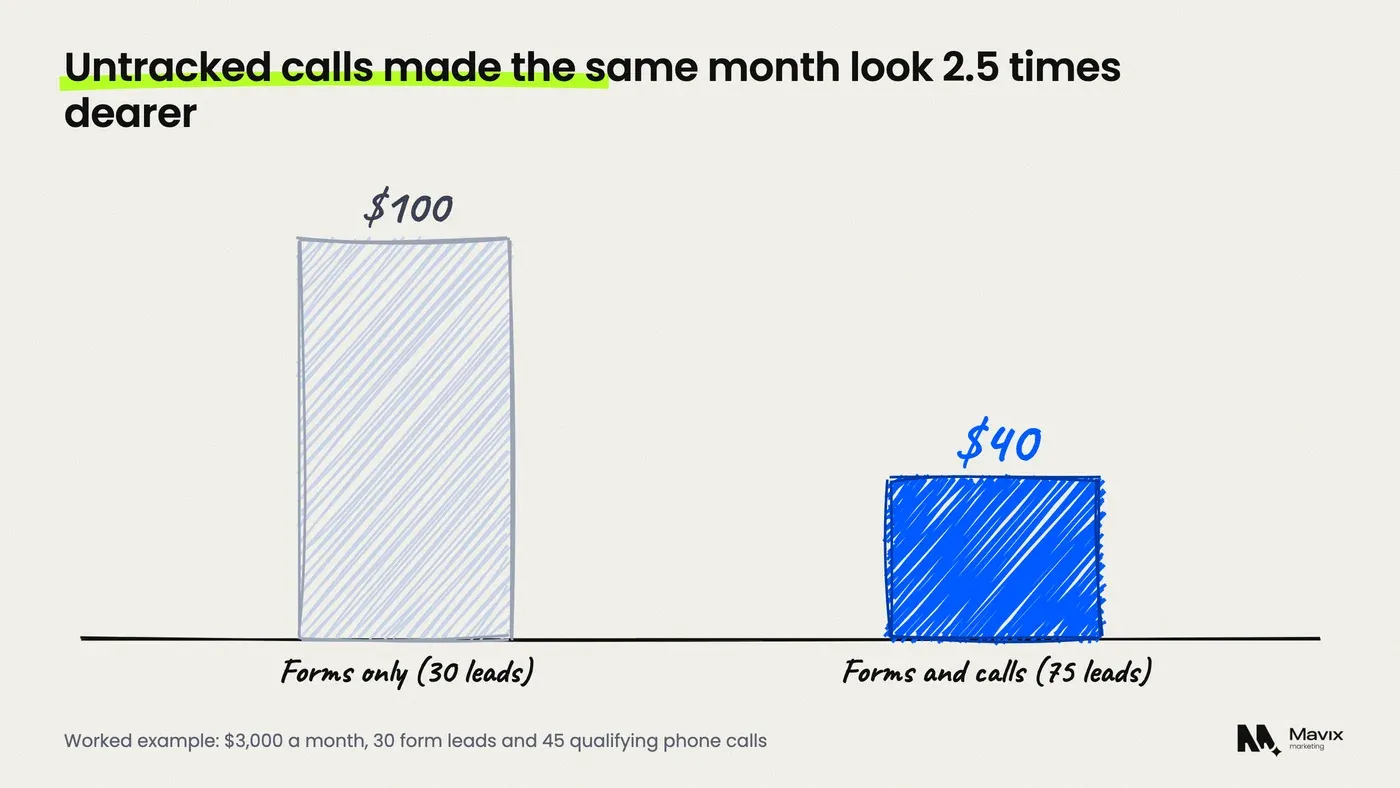
A worked example shows the size of the gap. Say a roofer spends $3,000 a month and gets 30 form leads and 45 phone calls that last long enough to be real enquiries.
| What is tracked | Leads counted | Reported cost per lead |
|---|---|---|
| Forms only | 30 | $100 |
| Forms and calls | 75 | $40 |
The table shows the same month, the same spend and the same customers, with a cost per lead 2.5 times higher when calls are invisible. The owner looking at $100 a lead might cut a campaign that is working. If your account shows clicks but almost no leads, check call tracking before anything else, and our post on Google Ads clicks with no leads lists the other causes.
What are the four ways to track calls in Google Ads?
Google Ads offers four call conversion types, and each sees a different part of the phone journey (Google Ads Help). Calls from ads track calls made straight from the ad. Calls from your website track calls to a forwarding number shown after an ad click. Mobile clicks track taps on your number. Imported calls bring in calls you record elsewhere.
| Conversion type | What it sees | What it misses | Needs |
|---|---|---|---|
| Calls from ads | Calls from call assets, location assets and call-only ads | People who visit the site first | A call asset with call reporting on |
| Calls from your website | Calls to a forwarding number shown after an ad click | Calls to numbers the tag does not replace | Google tag and phone snippet |
| Clicks on a mobile number | Taps on your number on mobile pages | Whether the call happened or lasted | A click event on the phone link |
| Imported calls | Calls your own system recorded, with outcome | Nothing, if your records are complete | Caller number, start time, upload |
The table shows why most local businesses need at least the first two. Google says that for mobile clicks “we can only track these clicks, not the phone calls themselves”, so a tap that hangs up counts the same as a booked job. Use mobile clicks only as a backup, never as your main conversion.
How do you set up calls from ads?
Turn on call reporting, add a call asset with your business number, and create a “Calls from ads” conversion action with a minimum call length. Google then shows a forwarding number in the ad, and counts calls that last longer than your threshold (Google Ads Help). Clicks on call assets cost the same as a normal ad click.
- In Admin, open account settings and check call reporting is on.
- Add a call asset with your main local number to each search campaign.
- In Goals, create a conversion action, choose Phone calls, then Calls from ads.
- Set the minimum call length (see the section on call length below).
- Set the count to One, so a customer who calls three times is one lead.
- Make it a primary action, so bidding uses it.
Location assets, which show your address from Google Business Profile, also generate calls from ads. Keep the same main number on your Business Profile and directory listings, because a tracking number in your citations confuses the details search engines hold. Our post on local citations explains why.
How do you track calls from your website?
Install the Google tag on every page and add Google’s phone snippet with your business number. When someone arrives from an ad, the snippet swaps your number for a Google forwarding number. Calls made from the site after the click are then tracked to the keyword, ad and campaign (Google Ads Help). Google says these numbers come “without any cost to you”.
Three rules catch most setups:
- The number must match exactly. The phone snippet looks for the number as written in your page code, including the country code format. If your header says (512) 555-0100 and the snippet says 512-555-0100, nothing is replaced.
- One number per snippet. The standard snippet tracks one business number. Sites with several numbers need a separate setup or third-party software.
- Call reporting must be on. Website call conversions run on the same forwarding numbers as calls from ads.
Check it by clicking your own ad on a phone, loading the site and looking at the number. If it has not changed, the snippet is not working. Our tracking setup checklist has the full list of checks before you spend.
What minimum call length should you set?
Set the minimum call length just below the length of your shortest real booking call. Google counts a call as a conversion when it lasts longer than the minimum you set, and calls shorter than that are not counted, according to Google’s phone call conversion help page. Too short and wrong numbers count. Too long and quick bookings are missed.
To pick yours:
- Pull 20 recent calls from your phone system or call log: 10 that booked a job and 10 that did not.
- Note the length of each.
- Find the shortest call that booked.
- Set the threshold a little below it.
An emergency plumber who books in 50 seconds needs a lower threshold than a law firm whose intake calls run ten minutes. Trade accounts such as Google Ads for plumbers usually split emergency and planned work, and each can carry its own call conversion. Recheck the setting each quarter against what actually booked.
What are AI-qualified call leads?
AI-qualified call leads are Google Ads conversions where Google’s AI listens to recorded calls and counts only those that sound like a real enquiry, such as a caller asking about specific services. Google says call recording is “now turned on by default” for this, where both phone numbers are in the US or Canada (Google Ads Help).

Three things to know:
- Exceptions. Recording stays off if you turned it off before, or if your business is in healthcare or financial services.
- Fallback. If a call cannot be recorded, it counts as a conversion only if it lasts your set minimum duration.
- Your choice. You can turn call recording off in account settings, under Call ads. Check your state’s call recording consent law before deciding, and tell your team calls may be recorded.
AI qualification is a better filter than duration alone, because a long wrong-number call no longer counts. It still does not know whether the job booked. Only your own records do.
How do you import calls that turned into jobs?
Upload calls from your own records to an “Imported calls” conversion action, with the caller’s phone number, the call start time and the exact conversion action name. Google Ads matches them to calls that came through its forwarding numbers (Google Ads Help). This is how bidding learns which calls became paying customers.
The upload rules that matter:
- Phone format. Use E.164, a plus sign then country code and number, such as +15125550100, or a US number with area code.
- Conversion name. It must match the conversion action name exactly, including capital letters.
- Value. Optional, but add the job value when you have it, so bidding favours bigger jobs.
- Timing. Wait at least 4 hours after creating the action before the first upload, and include an extra day of data each time. Google does not count duplicates.
- No undo. Imported conversions cannot be removed, so check the file first.
Most small businesses start with a weekly upload from a spreadsheet. A lead tracking spreadsheet with caller number, call time and outcome is enough. Our post on Google Ads offline conversion import covers form leads that close later.
Do you need third-party call tracking software?
Most single-location businesses do not need it to start, because Google’s forwarding numbers are free and cover calls from ads and from the website. Third-party call tracking earns its cost when you also want to track calls from SEO, Meta ads or print, record calls outside the US and Canada, or track several numbers per page. CallRail’s call tracking plan starts at $50 a month for 5 local numbers and 250 minutes (CallRail).
If you use third-party software, send its calls to Google Ads through its own integration or an import, and switch off the matching Google call conversion. Two systems counting the same call doubles your leads and teaches bidding the wrong lesson. When you want someone to set this up and run the account, Google Ads management starts with the conversion tracking.
Questions people ask about Google Ads call tracking
Does Google Ads call tracking cost extra?
No. Google forwarding numbers for calls from ads and calls from your website are free, and clicks on call assets cost the same as a normal ad click. You pay only if you add third-party call tracking software, which you need mainly to track calls from channels other than Google Ads.
Why are my Google Ads calls not showing as conversions?
The usual causes are call reporting turned off, a call asset missing from the campaign, or a minimum call length set too high. Another cause is a phone snippet whose number does not match the number on your page exactly. Check the call details report after a few days of live ads: if calls appear there but not as conversions, the call length is the problem.
Can Google Ads track calls from my Google Business Profile?
Calls that come from location assets in your ads count under calls from ads. Calls from your free Business Profile listing in the map results are not ad conversions, so Google Ads does not count them. Your Business Profile performance report shows those calls separately.
Should mobile phone number clicks count as conversions?
Only as a secondary action. Google tracks the click on your number, not the call, so someone who taps and hangs up counts the same as a booked customer. Use calls from your website as the main conversion, and keep mobile clicks for spotting whether people try to call at all.
Is call recording legal for my business?
It depends on where you and your callers are. A Kilpatrick Townsend summary counts 13 states, including California, Florida and Illinois, that require every party to consent. Google’s AI-qualified call leads record calls by default in the US and Canada unless you switch it off. Check your state’s rules and add a short recording notice to your phone greeting if needed.
How long before call tracking data is useful?
You see individual calls within a day, but bidding needs enough conversions to learn from. A small account with a handful of calls a week should give it a full month before judging keywords or cost per lead. It should also import booked jobs weekly, so that month teaches Google which calls paid.
The bottom line
Turn on calls from ads and calls from your website this week, set the minimum call length from your own booking calls, and keep mobile clicks as a secondary action. Then upload which calls booked. Until calls are counted, every cost per lead in the account is wrong.
If your Google Ads account counts forms but not calls, get your call tracking checked for free. You get a written list of what is missing and what is double counted, usually within one working day.
Free review
Want this looked at on your own site?
Send the address. A person reads it and writes back with the two or three things that would move your enquiry number first. Free, and yours to keep whether you hire us or not.