Klaviyo vs Mailchimp for a small business: what each costs at your list size, and which one fits how you sell
Klaviyo or Mailchimp? Prices at 500 to 50,000 contacts, who each billing rule hurts, which one fits a store or a service business, and how to switch safely.
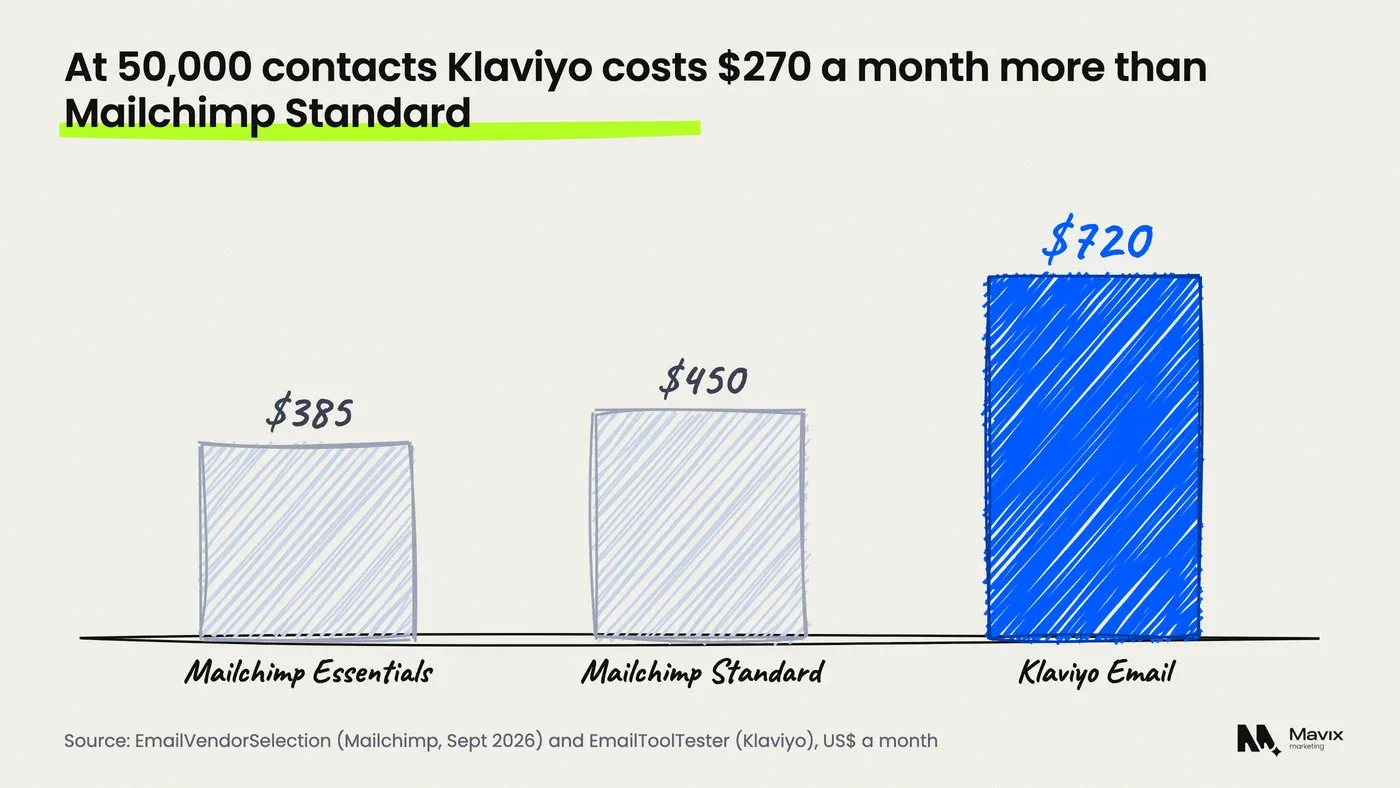
Pick Klaviyo if you run an online store, especially on Shopify, and want emails triggered by what people browse and buy. Pick Mailchimp if you run a service business or a small store with simple needs, because it costs the same or less at every list size. At 50,000 contacts, Mailchimp Standard is $450 a month and Klaviyo’s Email plan is $720.
This comparison is for owners of small US businesses choosing their first email platform or wondering whether to switch. It covers price at four list sizes, the billing rules that change the real bill, which business each one suits, automations, deliverability and how to move from one to the other.
The short version
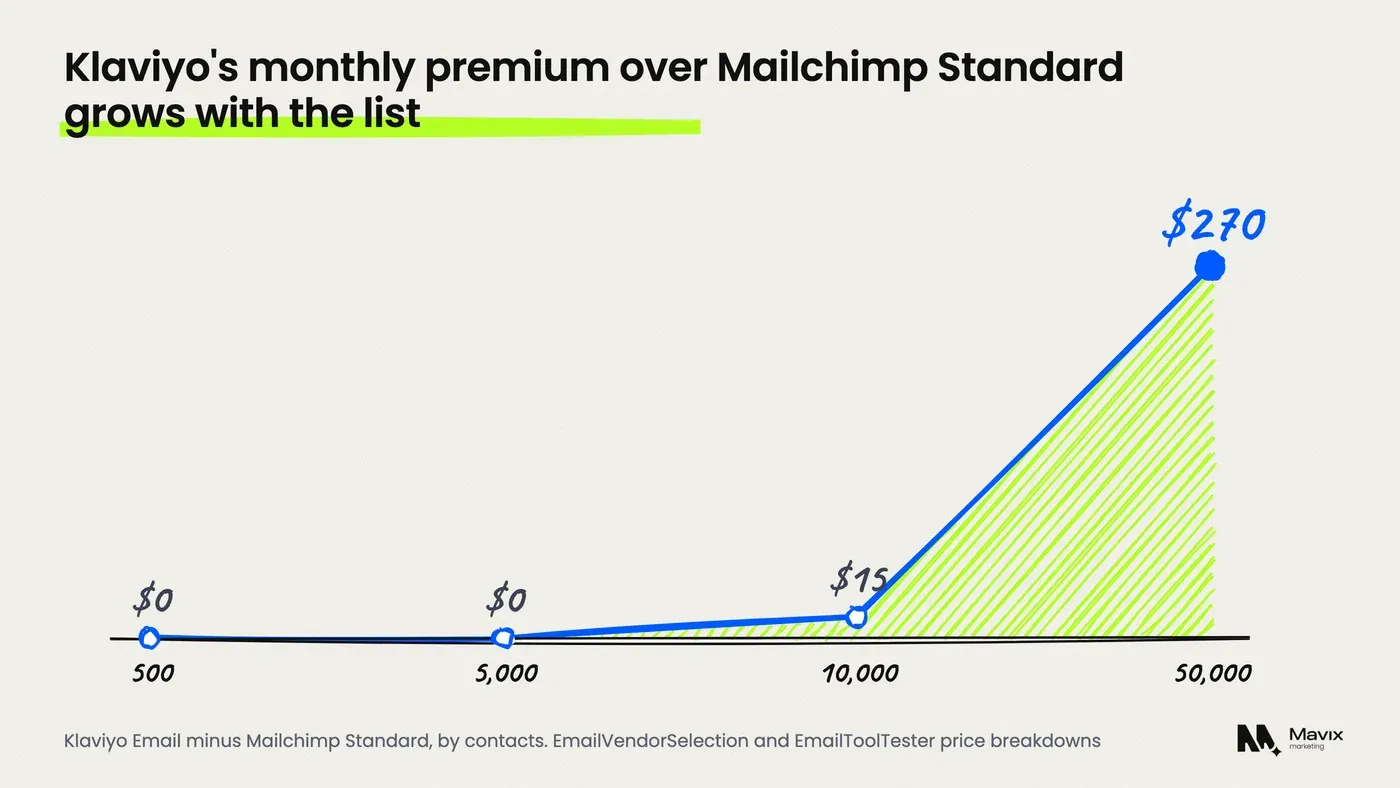
- At 500 contacts, Mailchimp Standard and Klaviyo Email both cost $20 a month. At 10,000 contacts, Klaviyo is $150 against $135 for Mailchimp Standard. At 50,000, it is $720 against $450.
- Mailchimp counts subscribed, unsubscribed and non-subscribed contacts in your bill. Archived, cleaned and deleted contacts do not count.
- Klaviyo bills on active profiles, meaning profiles that can be emailed. Suppressed profiles do not count toward the email plan.
- Mailchimp Essentials limits automation flows to 4 steps. Standard is the cheapest Mailchimp plan for proper welcome and abandoned cart sequences.
- Klaviyo’s predictive features, such as expected customer lifetime value, need at least 500 customers who have placed an order and 180 days of order history.
What is the main difference between Klaviyo and Mailchimp?
Klaviyo is an email and SMS platform built around ecommerce data, and Mailchimp is a general email platform that also connects to online stores. Klaviyo reads every order, product view and cart from your store and lets you trigger and segment on them. Mailchimp is easier to learn, cheaper at large list sizes and fits businesses that sell a service, not a product.
The difference shows in what each one asks you first. Klaviyo’s setup starts with connecting a store. Mailchimp’s starts with building an audience and a newsletter. A plumbing company or a dental practice has no store to connect, so most of what Klaviyo charges extra for goes unused. A Shopify store with a few thousand buyers uses it every day.
How much do Klaviyo and Mailchimp cost at each list size?
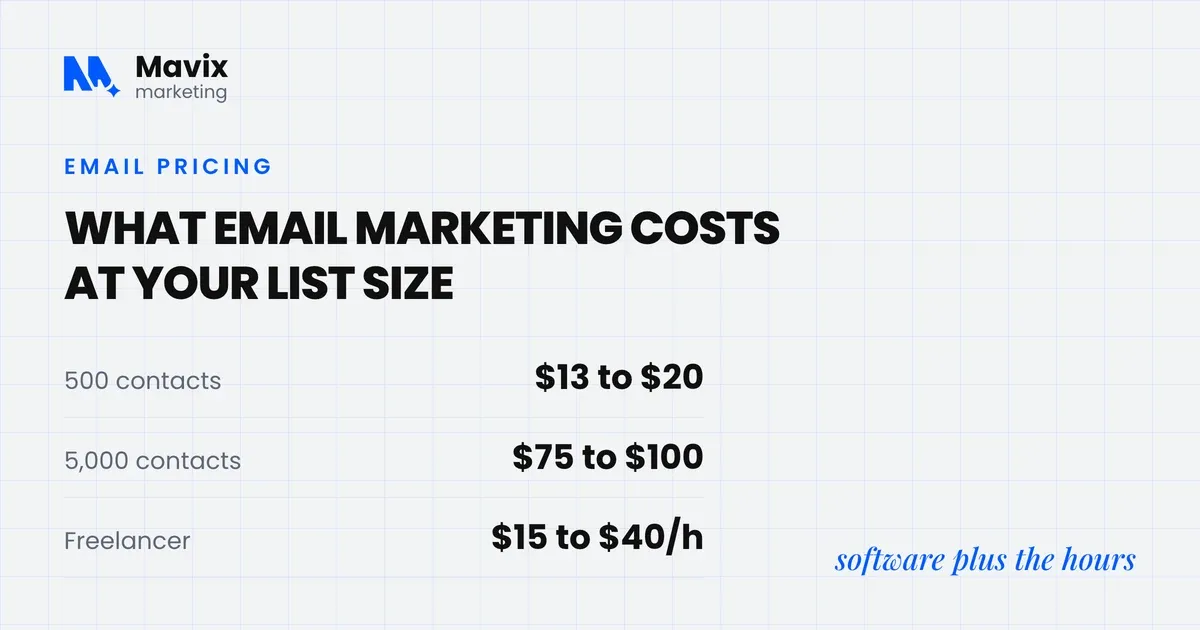
At small lists the two cost about the same, and the gap opens as the list grows. Published price breakdowns put Mailchimp Standard at $20 a month for 500 contacts and $450 for 50,000 (EmailVendorSelection). They put Klaviyo’s Email plan at $20 for 500 profiles and $720 for 50,000 (EmailToolTester).
| Contacts | Mailchimp Essentials | Mailchimp Standard | Klaviyo Email |
|---|---|---|---|
| 500 | $13 | $20 | $20 |
| 5,000 | $75 | $100 | $100 |
| 10,000 | $110 | $135 | $150 |
| 50,000 | $385 | $450 | $720 |
The table shows a tie up to about 5,000 contacts between Klaviyo and the Mailchimp plan most small businesses need, then a gap that reaches $270 a month at 50,000. All prices are US dollars a month on monthly billing. The Mailchimp figures come from a breakdown dated 18 September 2026. Both vendors show promotional and local-currency prices on their own pages, so check the price on the day you sign up.
Send limits matter too. Mailchimp’s help centre says the monthly send limit is 10 times your contact limit on Essentials, 12 times on Standard and 15 times on Premium (Mailchimp). Klaviyo’s pricing page shows 5,000 emails a month on the 500-profile Email plan, the same 10 times ratio. For the full cost of running email, labour included, read how much email marketing costs in 2026.
Which contacts do you pay for on each platform?
Mailchimp bills you for unsubscribed contacts until you archive or delete them, and Klaviyo does not bill you for suppressed ones. Mailchimp’s help centre says subscribed, unsubscribed and non-subscribed contacts are all included in your contact count, while archived, cleaned and deleted contacts are not.
Klaviyo’s help centre says email billing is based on active profiles, which it defines as any profile that can be emailed. It says suppressed profiles do not count toward the email plan’s active profile count (Klaviyo). The same article warns that a lower count does not lower your bill by itself. You may need to choose a lower plan unless auto-downgrade is on for your account.
A worked example shows why this matters. Say your Mailchimp audience has 5,000 subscribers and has collected 1,000 unsubscribes over the years. Mailchimp counts 6,000 contacts, which pushes you past the 5,000 tier. Archive the 1,000 and you are back on it. On Klaviyo, those 1,000 would be suppressed and would not count. The fix on Mailchimp takes ten minutes, and few owners know to do it.
Which one suits an online store?
Klaviyo suits most online stores with steady orders, because every email can react to what a shopper did in the store. Klaviyo’s own data from more than 110,000 customers puts abandoned cart flows at an average of $6.77 in revenue per email recipient, and $13.70 for the top 10 percent of brands (Klaviyo). These are Klaviyo’s figures about its own customers.
Run that number through a small store. Say 150 shoppers a month leave a cart and get the email. At Klaviyo’s average, that is about $1,016 a month in attributed revenue (150 times $6.77). The extra cost of Klaviyo over Mailchimp Standard at 10,000 contacts is $15 a month. On numbers like those, the platform choice is not the expensive decision. Building the flows is.
Two limits apply:
- Predictive features need history. Klaviyo’s help centre says expected lifetime value and similar predictions appear only under three conditions. At least 500 customers must have placed an order. There must be 180 days of order history. Some customers must have ordered 3 or more times (Klaviyo). A new store will not see them for months.
- Mailchimp also does carts. Mailchimp connects to stores and can send abandoned cart emails once a store is connected. For a store with a few hundred orders a month and simple products, that may be all it needs, for less.
For the store-specific setup, see email marketing for ecommerce stores.
Which one suits a service business?
Mailchimp suits most service businesses, such as plumbers, dentists, law firms and cleaners, because they need newsletters, review requests and short follow-up sequences, not product and cart data. Mailchimp’s own help centre lists automation flows of up to 4 steps on Essentials and expanded flows on Standard. Klaviyo’s main strengths run on order data a service business does not have.

A service business still gets real money from email. The flows that pay first are a welcome series for new enquiries, a quote follow-up and a review request after the job. The email flows checklist puts them in payback order, and the plan for a welcome email sequence shows the first one step by step. If you want those flows built and running without learning either platform, email marketing for small businesses is where we do that.
How do the automations compare?
Both platforms can send welcome, abandoned cart and win-back sequences, but Mailchimp gates the longer ones behind Standard. Mailchimp’s help centre limits Essentials to automation flows with up to 4 steps, and EmailVendorSelection’s breakdown lists 200 journey points on Standard and Premium. Klaviyo’s pricing page does not split automation by plan the way Mailchimp does.
| Need | Mailchimp | Klaviyo |
|---|---|---|
| Monthly newsletter | Any plan, simple editor | Any plan |
| 3 to 5 email welcome series | Standard (Essentials stops at 4 steps) | Not split by plan on the pricing page |
| Abandoned cart and browse abandonment | Needs a connected store | Built around the store connection |
| Trigger on a product bought or viewed | Possible once a store is connected | Main strength |
| Predicted lifetime value | Check your plan | Needs 500 buyers and 180 days of orders |
The table shows the practical rule. A business that needs three or four timed emails can live on Mailchimp Standard. A business that wants emails to change by product, spend or browsing gets more from Klaviyo. For the cart sequence itself, read how to build an abandoned cart email sequence.
Does Klaviyo or Mailchimp get better deliverability?
Neither platform decides whether your emails reach the inbox on its own. Inbox placement depends mostly on your domain authentication, how engaged your list is and how many people mark you as spam. Both platforms support the domain authentication Gmail and Yahoo require from bulk senders.
What changes deliverability is how you send:
- Authenticate your own sending domain on whichever platform you use. The rules are set out in what Gmail, Yahoo and Outlook now require from bulk senders.
- Send to people who opened or clicked recently, and stop mailing people who have not engaged for months.
- Keep spam complaints low by making the unsubscribe link easy to find.
If emails are already landing in spam, the platform is rarely the cause. Work through why your emails go to spam before paying to switch.
How do you move from Mailchimp to Klaviyo without losing deliverability?
Use Klaviyo’s built-in Mailchimp integration, then warm up slowly by mailing your most engaged people first. Klaviyo’s migration guide says the integration syncs subscriber information, including unsubscribes and cleaned contacts, audiences as lists, and open and click activity for campaigns sent in the last 90 days. It does not sync tags, which you export and import as a file (Klaviyo).
The steps, in order:
- Disconnect Mailchimp from Shopify first. Klaviyo warns that leaving the old connection on can send double opt-in emails to your existing list.
- Connect the integration with a Mailchimp API key and pick which audiences to sync.
- Check suppressions. Review the imported unsubscribes before the first send, and upload any missing ones to Klaviyo’s suppression list.
- Rebuild templates and flows. Mailchimp does not export drag-and-drop templates, and automations have to be rebuilt as Klaviyo flows.
- Warm the sending domain. Klaviyo’s warming guide says to send only to people engaged in the last 30 days for the first two weeks, and to keep the first campaign under 10,000 recipients (Klaviyo).
- Turn off Mailchimp automations before the Klaviyo flows go live, so nobody gets two welcome emails.
Moving the other way, Klaviyo to Mailchimp, follows the same logic: export suppressions first, import them as unsubscribed, and warm up on your engaged contacts.
When is switching not worth it?
Switching is not worth it when your list is small, your sends are simple and nobody has built the flows yet. Moving a 2,000-contact newsletter list from Mailchimp to Klaviyo changes the bill by a few dollars and costs weeks of setup and warming. The flows you have not built yet are worth more than the platform you build them on.
Stay put if:
- you sell a service and send one newsletter a month
- your Mailchimp bill is high because of unsubscribed contacts you could archive today
- your emails reach the inbox and the only complaint is the editor
Switch if you run a store that has outgrown Mailchimp’s product triggers, or a service business paying for Klaviyo features it never uses.
Questions people ask about Klaviyo and Mailchimp
Is Klaviyo more expensive than Mailchimp?
At large lists, yes. At 500 contacts both Klaviyo Email and Mailchimp Standard cost $20 a month, and at 5,000 both cost $100, in published 2026 breakdowns. At 10,000 contacts Klaviyo is $150 against $135, and at 50,000 it is $720 against $450. Mailchimp Essentials is cheaper still, but its automations stop at 4 steps.
Do both platforms have a free plan?
Yes, and both are small. Klaviyo’s pricing page lists a free plan of up to 250 active profiles and 500 emails a month. Mailchimp’s help centre lists a free plan with 500 sends a month and a daily cap of 250. Both suit testing a sign-up form, not running a business’s email.
Is Klaviyo only for Shopify stores?
No, but it is built around ecommerce data. Klaviyo connects to Shopify and other store platforms and to custom data through its API. A service business can use it for newsletters and simple flows, but it pays for store features it will not use. Mailchimp is usually the better fit when there is no online store.
Can I use Mailchimp for an online store?
Yes. Mailchimp connects to online stores and sends abandoned cart and purchase follow-up emails. It suits a store with a simple catalogue and modest order volume. Stores that want emails to change by product, spend or browsing history, or want predicted lifetime value, usually outgrow it and move to Klaviyo.
Will I lose my subscribers if I switch?
Not if you follow the migration steps. Klaviyo’s Mailchimp integration copies subscribers, unsubscribes, cleaned contacts and 90 days of open and click data. Tags need a separate file import. What can go wrong is deliverability, so warm the new account by mailing engaged contacts first for the first two weeks.
Which one is easier to learn?
Mailchimp is usually easier for a first-time user, because its setup starts with a newsletter and a simple audience. Klaviyo asks for a store connection and gives more options for segments and triggers, which takes longer to learn and pays back only when you have the order data to use them.
The bottom line
If you sell products online and have steady orders, choose Klaviyo and build the cart, browse and post-purchase flows in the first month. If you sell a service, choose Mailchimp Standard, archive unsubscribed contacts every quarter, and spend the money you save on the welcome and follow-up emails.
If you would rather have the platform picked and the first flows built for you, get a free email marketing plan for your business. You get the platform that fits your list, the three flows to build first and what each will cost, usually within one working day. Prices for running it are on the email marketing pricing page.
Free review
Want this looked at on your own site?
Send the address. A person reads it and writes back with the two or three things that would move your enquiry number first. Free, and yours to keep whether you hire us or not.